跳转到主内容

Battery Disconnection

仅作为前提条件
本指南仅提供前提条件!本指南是另一个程序的一部分,不能单独使用。

你所需要的

  1. Battery Disconnection, Prepare your phone for disassembly: 步骤 1 中的图像 1,1
    • Let your phone's battery drain below 25% before starting this repair. A charged lithium‑ion battery may catch fire if damaged.

    • Unplug all cables and completely power off your phone.

  2. Battery Disconnection, Separate the back cover: 步骤 2 中的图像 1,3 Battery Disconnection, Separate the back cover: 步骤 2 中的图像 2,3 Battery Disconnection, Separate the back cover: 步骤 2 中的图像 3,3
    • A screw‑driven camshaft in the bottom left corner pushes the back cover away from the phone, creating a gap to begin separating the cover.

    • With the back cover facing up, use a T3 Torx screwdriver to turn the screw in the bottom edge counterclockwise until the back cover pops up.

  3. Battery Disconnection: 步骤 3 中的图像 1,3 Battery Disconnection: 步骤 3 中的图像 2,3 Battery Disconnection: 步骤 3 中的图像 3,3
    • Before separating the back cover, note the following:

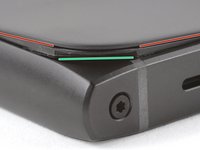
    • There's a seam just under the back cover panel. Don't insert your tool here.

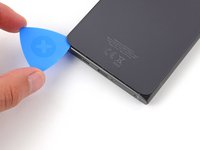
    • Insert your tool completely under the back cover, so it's between the frame and the underside of the back cover.

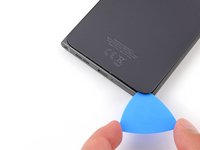
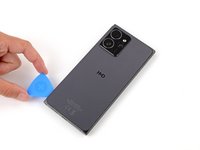
    • Insert an opening pick under the bottom left corner of the back cover and slide it along the bottom edge to release the clips and separate the adhesive.

    • You should feel and hear the back cover clips release. If you don't, insert the pick deeper and try again.

  4. Battery Disconnection: 步骤 4 中的图像 1,3 Battery Disconnection: 步骤 4 中的图像 2,3 Battery Disconnection: 步骤 4 中的图像 3,3
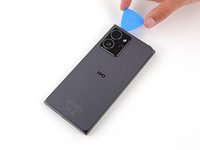
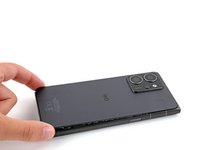
    • Continue sliding the pick under the perimeter of the back cover to fully separate the clips and adhesive.

  5. Battery Disconnection, Remove the back cover: 步骤 5 中的图像 1,3 Battery Disconnection, Remove the back cover: 步骤 5 中的图像 2,3 Battery Disconnection, Remove the back cover: 步骤 5 中的图像 3,3
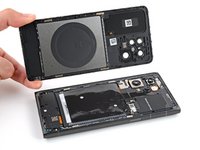
    • Lift and remove the back cover.

    • During reassembly:

    • Now is a good time to test your phone before sealing it up. Power it on and check that it works. Power it back down before you continue reassembly.

    • If you're installing a new back cover:

    • Make sure you remove all liners from the underside.

    • Use the flat end of a spudger to press the small cable above the wireless charging coil into place over its alignment posts.

    • Place the back cover onto the frame and firmly squeeze around the perimeter to reengage all the clips.

  6. Battery Disconnection, Disconnect the battery: 步骤 6 中的图像 1,2 Battery Disconnection, Disconnect the battery: 步骤 6 中的图像 2,2
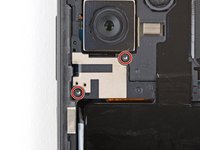
    • Use a T3 Torx screwdriver to remove the two screws securing the battery connector cover.

  7. Battery Disconnection: 步骤 7 中的图像 1,2 Battery Disconnection: 步骤 7 中的图像 2,2
    • Gently flip the graphite sheet on the battery over the top edge of your phone.

    • Be careful not to tear the sheet, as it's very delicate.

  8. Battery Disconnection: 步骤 8 中的图像 1,3 Battery Disconnection: 步骤 8 中的图像 2,3 Battery Disconnection: 步骤 8 中的图像 3,3
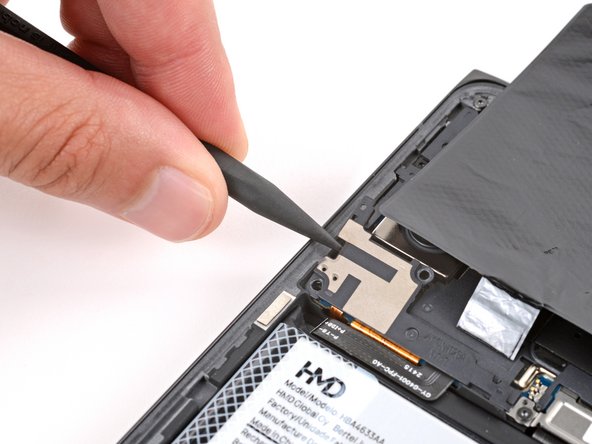
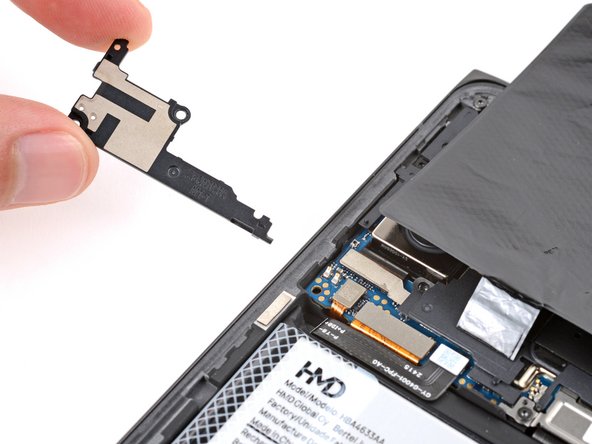
    • Insert the point of a spudger in the notch on the left edge of the battery connector cover and pry up to release its clips.

    • Only insert your tool enough to pry up the cover. Otherwise, you may accidentally disconnect the rear camera press connector.

    • Remove the cover.

    • During reassembly, firmly press the cover into place to engage the clips.

  9. Battery Disconnection: 步骤 9 中的图像 1,3 Battery Disconnection: 步骤 9 中的图像 2,3 Battery Disconnection: 步骤 9 中的图像 3,3
    • Insert the tip of an opening pick under the top edge of the battery press connector and pry up to disconnect it.

    • Check if the rear camera press connector got disconnected during the previous step. If it did, reconnect it.

    • To reconnect a press connector, align it over the socket and gently press down on one side until it clicks into place, then press down on the other side. It might take a few tries to align the connector.

结论

To reassemble your device, follow these instructions in reverse order.

Spencer Day

于09/14/22注册

155,120 声望

创作了1,033篇指南

团队

iFixit iFixit 的会员

Staff

123 名成员

创作了23,788篇指南

0指南评论

添加评论

浏览统计数据:

过去 24 小时: 0

过去 7 天: 1

过去 30 天: 4

总计 81