跳转到主内容
加入维修社区 - 创建账户

Battery Disconnect

仅作为前提条件
本指南仅提供前提条件!本指南是另一个程序的一部分,不能单独使用。

你所需要的

  1. Battery Disconnect, Back Cover: 步骤 1 中的图像 1,1
    • Before you begin, switch off your phone.

    • Apply a heated iOpener to the back of the phone to loosen the adhesive beneath the back cover. Apply the iOpener for at least two minutes.

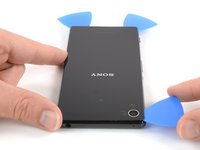
  2. Battery Disconnect: 步骤 2 中的图像 1,3 Battery Disconnect: 步骤 2 中的图像 2,3 Battery Disconnect: 步骤 2 中的图像 3,3
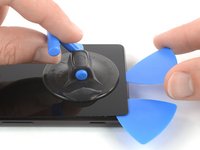
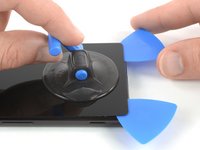
    • Secure a suction handle to the bottom of the back cover, as close to the edge as possible.

    • Lift the back cover with the suction handle to create a small gap between the cover and the frame.

    • Insert an opening pick into the gap.

    • If you have trouble, apply more heat to further soften the adhesive. Follow the iOpener instructions to avoid overheating.

    • Slide the opening pick to the bottom left corner.

  3. Battery Disconnect: 步骤 3 中的图像 1,2 Battery Disconnect: 步骤 3 中的图像 2,2
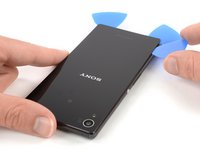
    • Insert a second opening pick and slide it to the bottom right corner to cut the adhesive.

    • Leave the opening picks in place to prevent the adhesive from resealing.

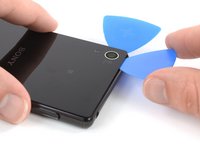
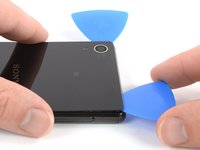
  4. Battery Disconnect: 步骤 4 中的图像 1,3 Battery Disconnect: 步骤 4 中的图像 2,3 Battery Disconnect: 步骤 4 中的图像 3,3
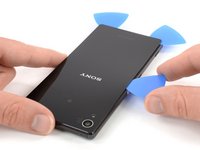
    • Insert a third opening pick at the bottom left corner.

    • In the next few steps whilst cutting around the rear camera make sure you only use the tip of the opening pick to avoid smearing the lens or damaging the camera.

    • Start to slide the tip of the opening pick from the bottom left corner along the side of the phone to cut the adhesive.

    • Leave the opening pick in its place at the top left corner to prevent the adhesive from resealing.

  5. Battery Disconnect: 步骤 5 中的图像 1,2 Battery Disconnect: 步骤 5 中的图像 2,2
    • If the adhesive becomes hard to cut it most likely cooled down. Use your iOpener to reheat it.

    • Insert a fourth opening pick under the top left corner of the back cover.

    • Slide the opening pick along the top edge of the phone to cut the adhesive.

    • Leave the opening pick in the top right corner to prevent the adhesive from resealing.

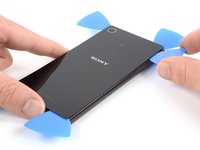
  6. Battery Disconnect: 步骤 6 中的图像 1,2 Battery Disconnect: 步骤 6 中的图像 2,2
    • Insert a fifth opening pick at the top right corner of the phone.

    • Slide the opening pick along the right side to cut the remaining adhesive.

  7. Battery Disconnect: 步骤 7 中的图像 1,2 Battery Disconnect: 步骤 7 中的图像 2,2
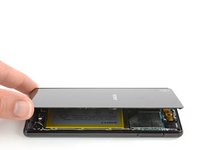
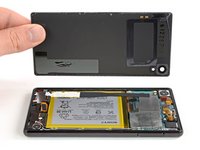
    • Lift and remove the back cover.

    • After installing the back cover, apply strong, steady pressure to your phone for several minutes to help the adhesive form a good bond, such as by placing it under a stack of heavy books.

  8. Battery Disconnect, Battery Disconnect: 步骤 8 中的图像 1,3 Battery Disconnect, Battery Disconnect: 步骤 8 中的图像 2,3 Battery Disconnect, Battery Disconnect: 步骤 8 中的图像 3,3
    在这个步骤中使用的工具:
    Tweezers
    $4.99
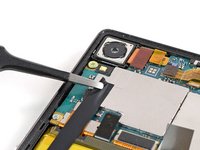
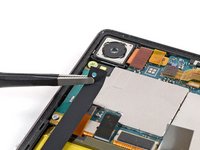
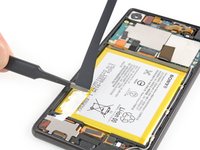
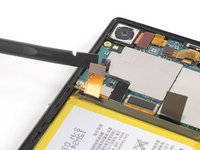
    • Use a pair of tweezers to carefully peel the adhesive strip off the mother board and the battery and remove it.

  9. Battery Disconnect: 步骤 9 中的图像 1,2 Battery Disconnect: 步骤 9 中的图像 2,2
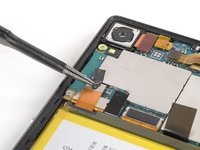
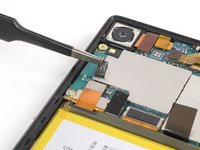
    • Use a pair of tweezers to peel the black adhesive strip off the battery connector and fold it out of the way.

  10. Battery Disconnect: 步骤 10 中的图像 1,2 Battery Disconnect: 步骤 10 中的图像 2,2
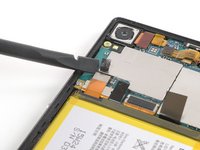
    • Use a spudger to pry up and disconnect the battery connector.

结论

To reassemble your device, follow these instructions in reverse order.

Dominik Schnabelrauch

于11/23/16注册

248,989 声望

创作了682篇指南

团队

iFixit iFixit 的会员

Staff

123 名成员

创作了23,895篇指南

0指南评论

添加评论

浏览统计数据:

过去 24 小时: 1

过去 7 天: 1

过去 30 天: 5

总计 85