
Aoson R103 Speakers Replacement

Louis 和
最后更新于 2026年1月14日
浏览量: 745
浏览统计数据:
- 过去24小时
- 3
- 过去 7 天:
- 15
- 过去 30 天:
- 59
- 总计
- 745
评论: 0
暂时还没有人对本指南发表评论。你想做第一个评论的人吗?
Go to guide comments已完成: 1 2
1 人已将本指南标记为“已完成”。你会是下一个完成的人吗?
2 人已将本指南标记为“已完成”。包括你——干的漂亮!
收藏: 0 1
暂时还没有人收藏(和订阅)本指南。你会是第一个收藏(和订阅)的人吗?
1 人收藏(并订阅)了本指南——那就是你!
动态照片拍摄
成为一个动作片主人公!本指南需要一些图片,这些图片能够更好演示如何进行某些特定操作。
需要更好的图片
更好的照片将改善本指南。请帮助拍摄,编辑,或上传新的图片!
缺少的步骤
糟糕!本指南目前缺少一些重要的步骤。
简介
转到步骤 1 ↓This guide replaces Aoson R103 Speakers, which will require soldering. This guide can be used to fix distorted or broken audio and will require you to dismantle and redo electrical connections.
Be sure to disconnect the power from the battery to ensure you do not damage the device or injur yourself via electric shock. Exercise caution while soldering so that you do not burn anything.
你所需要的
工具


-
-
-
Turn off the device using the power button.
-
Using fingernails/a pry tool, separate the back panel of the device. This may require some force, as they are connected by push tabs.
 询问修复机器人
-
-
-
-
-
-
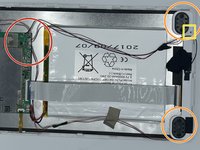
These are the motherboard connections to the speaker, which will be needed later.
-
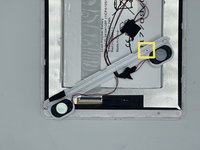
These are the two speakers, which are attached to a plastic piece via a screw.
-
Remove the 4.0mm long Phillips #00 screw where the plastic disconnects.
-
-




To reassemble your device, follow these instructions in reverse order.
另外一个人完成了本指南。

团队

University of North Texas, Team 3-7, Saru Jimmy Spring 2023 University of North Texas, Team 3-7, Saru Jimmy Spring 2023 的会员
UNT-SARU JIMMY-S23S3G7
4 名成员
创作了48篇指南
