简介
This guide shows how to replace the Wi-Fi card in the Acer Swift X N20C12. The Wi-Fi card is a component that lets the laptop connect to Wi-Fi.
If the laptop is facing frequent connectivity issues no matter what Wi-Fi network you try to connect to, then a replacement might fix the issue.
你所需要的
-
-
Use a T5 Torx screwdriver to remove the eleven screws that secure the lower case.
-
-


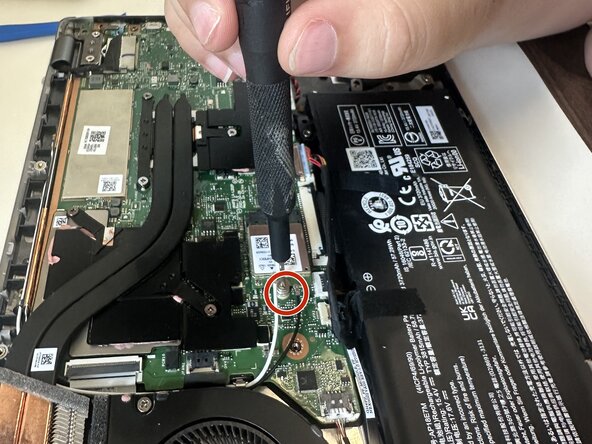
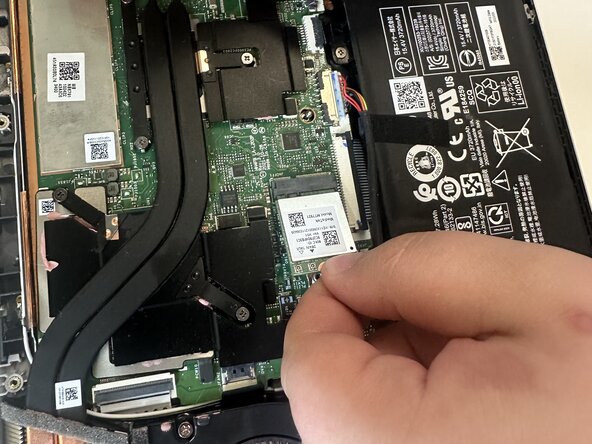
To reassemble your device, follow the above steps in reverse order.
Take your e-waste to an R2 or e-Stewards certified recycler.
Repair didn’t go as planned? Try some basic troubleshooting or ask our Answers community for help.
另外一个人完成了本指南。



团队

Austin Community College, Team 22-3, Watkins Summer 2025 Austin Community College, Team 22-3, Watkins Summer 2025 的会员
AUSTINCC-WATKINS-SU25S22G3
4 名成员
创作了5篇指南
