跳转到主内容

更换任天堂Switch背部外壳

你所需要的

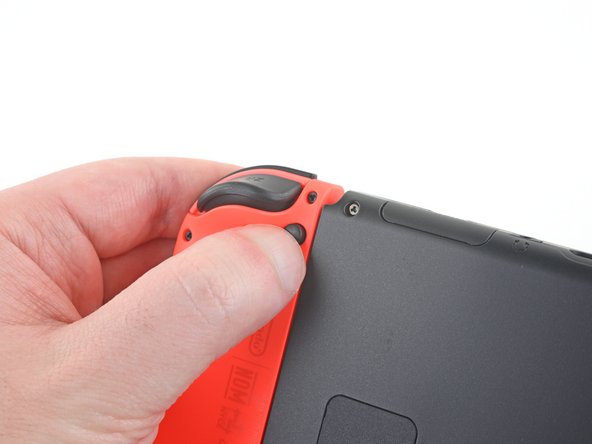
  1. 更换任天堂Switch背部外壳, Joy Con 游戏手柄: 步骤 1 中的图像 1,3 更换任天堂Switch背部外壳, Joy Con 游戏手柄: 步骤 1 中的图像 2,3 更换任天堂Switch背部外壳, Joy Con 游戏手柄: 步骤 1 中的图像 3,3
    • 开始维修之前,请确保设备已完全关闭电源。

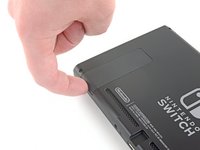
    • 按住 Joy Con 手柄背面的圆形小按钮。

    • 按住该按钮的同时,向上推动手柄。

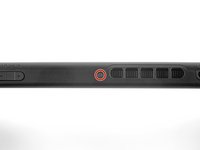
  2. 更换任天堂Switch背部外壳, 取下游戏手柄: 步骤 2 中的图像 1,3 更换任天堂Switch背部外壳, 取下游戏手柄: 步骤 2 中的图像 2,3 更换任天堂Switch背部外壳, 取下游戏手柄: 步骤 2 中的图像 3,3
    • 按住手柄背部的圆形按键,向上推动手柄直到将它与主机完全分开。

    • 按相同操作,卸下另一只手柄

  3. 更换任天堂Switch背部外壳, 移除背盖螺丝: 步骤 3 中的图像 1,1
    在这个步骤中使用的工具:
    Magnetic Project Mat
    $16.96
    • 使用 Y00 螺丝刀拧下固定在后盖上的 4 颗 6.3 毫米螺丝。

    • 在整个维修过程中,请妥善保管每一颗螺丝 ,并保证在装回时每颗螺丝都能安装至原来的位置。

    • 如果这四颗 6.3 毫米螺丝滑丝了,在谨慎的操作和一点运气下,也许有机会用 Y0 批头拧下来。如果真的这么做,请注意需要多给螺丝刀一些力螺丝刀才能咬住螺丝。

    • 如果你很幸运,用这种方法成功拧下了滑丝的螺丝,记得装机时换一颗新的,千万不要再拧回去了。

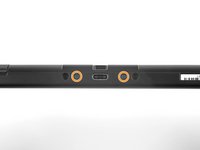
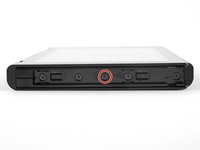
  4. 更换任天堂Switch背部外壳, 移除顶部和底部螺丝: 步骤 4 中的图像 1,2 更换任天堂Switch背部外壳, 移除顶部和底部螺丝: 步骤 4 中的图像 2,2
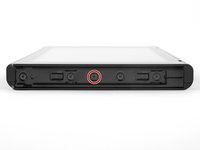
    • 使用 JIS 00 螺丝刀卸下固定后面板的以下螺丝:

    • 设备顶部边缘的一个 2.5 毫米长的螺丝

    • 设备底部边缘有两个 2.5 毫米长的螺丝

    • 为防止这些紧固的螺丝拧花,请向下用力,缓慢工作,如果螺丝无法脱落,请尝试使用另一个 JIS 00 螺丝刀。确保螺丝刀已完全插入。

    • 您可以在紧要关头使用十字 #000 螺丝刀,但您可能会损坏或拧花螺丝。用力向下推螺丝刀并慢慢扭转。通常,切换螺丝刀可能会有所帮助,即使它们的大小相同。

  5. 更换任天堂Switch背部外壳, 拆卸两侧中心螺钉: 步骤 5 中的图像 1,2 更换任天堂Switch背部外壳, 拆卸两侧中心螺钉: 步骤 5 中的图像 2,2
    • 使用 JIS 00 螺丝刀拧下2颗长度为3.8毫米,位于设备两侧中央的中心螺丝(每侧各一颗)

  6. 更换任天堂Switch背部外壳: 步骤 6 中的图像 1,2 更换任天堂Switch背部外壳: 步骤 6 中的图像 2,2
    • 用手指翻起 Switch 主机背部用的支架

    • 注意: 如果卡槽里有 Micro SD 卡的话,在开始下一步之前需要先将它取下来。

  7. 更换任天堂Switch背部外壳, 拆卸支架的螺丝: 步骤 7 中的图像 1,1
    • 使用 JIS 00 螺丝刀拧下位于主机支架凹槽内的一颗 1.6 毫米的螺丝

    • 将支架盖上。

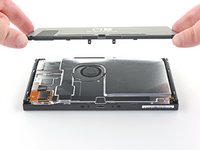
  8. 更换任天堂Switch背部外壳, 拆卸后盖板: 步骤 8 中的图像 1,3 更换任天堂Switch背部外壳, 拆卸后盖板: 步骤 8 中的图像 2,3 更换任天堂Switch背部外壳, 拆卸后盖板: 步骤 8 中的图像 3,3
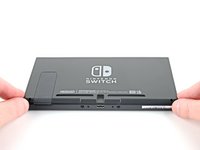
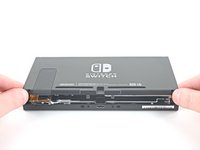
    • 从设备底部提起后盖并取下

    • 背部盖板连接到塑料外壳的另一半,防止你在关闭后面板时将其完全抬起。

    • 从设备底部向上提起后面板并将其卸下。

结论

将新替换部件与原始部件进行比较。在安装之前,您可能需要从新部件转移剩余组件。

要重新组装设备,请按照逆序进行操作。

请将维修过程产生的电子垃圾带到R2或e-Stewards认证的回收站

维修没有按计划进行吗?尝试一些基本故障排除后的故障排除,或向我们的任天堂 Switch 问答社区寻求帮助。

89等其他人完成本指南。

由衷感谢以下译者:

en zh

100%

这些译者帮助我们修补全世界! 您也想加入吗?
开始翻译 ›

Craig Lloyd

于02/10/16注册

41,056 声望

创作了82篇指南

11指南评论

Excellent and concise guide.

The new panel doesn’t come with the sticky grille pieces x 2 on the bottom. Is it supposed to be a straight transfer between the old and the new?

fclbriat123 - 回复

You can transfer the grill to the new back plat

Phillip Norton -

Just did this replacement and there are a few things to keep in mind that this review does not mention. There are x2 square foam pieces that can be transferred to the new panel located at the bottom backside of the old. Also, the game cartridge shield hardware and the kickstand holder hardware have to be taken off the back of the old panel and transferred to the new panel. The kickstand has 2 Phillips #000 screws and the game cartridge shield has 1 Phillips #000 screw

Ryan Talbert - 回复

How do you transfer the foam pieces? Use some heat to loosen their adhesive and then remove them and transfer over the new backplate?

John - 回复

Is the casing the same between the HAC model and the HAD model? This guide doesn’t specify

Julian Webb - 回复

添加评论

浏览统计数据:

过去 24 小时: 43

过去 7 天: 364

过去 30 天: 1,408

总计 120,476