跳转到主内容
加入维修社区 - 创建账户

本指南有最近更改,您可查看未经巡查的最新版本。

如何使iPhone进入Recovery模式

浏览量: 22万

浏览统计数据:

过去24小时
137
过去 7 天:
997
过去 30 天:
4,264
总计
221,184
评论: 14

2 comments on steps, 12 guide comments.

Go to guide comments
已完成: 132

132 人已将本指南标记为“已完成”。你会是下一个完成的人吗?

收藏: 3

3 人已收藏(并订阅)本指南。你会是下一个吗?

所需时间: 5 - 35 分钟
难度: 非常容易
社区贡献指南

我们社区的一个非常棒的成员制作了本指南。它不是由 iFixit 工作人员创建的。

如何使iPhone进入Recovery模式

以下情况可能需要你将手机置于Recovery模式:

  • 你忘记了你的iPhone密码或你的iPhone已停用。

*你的iPhone开机时卡在了苹果logo,并且不显示进度条。

*你的iPhone陷入了开机死循环。

  • 注意:如果你忘记了你的手机密码,你需要恢复设备。(出厂设置)

视频概述

    1. 如何使iPhone进入Recovery模式, 将你的iPhone连入电脑: 步骤 1 中的图像 1,1
      • 用一根闪电或USB-C数据线将iPhone连入到你的Mac或者PC。如果你用的是PC或者macOS Mojave及以上版本,请安装iTunes再进行操作。

      询问修复机器人

      添加评论

    2. 如何使iPhone进入Recovery模式, 混合按钮: 步骤 2 中的图像 1,1
      • 在 iPhone 8 或更新机型上:按下调高音量按钮再快速松开。按下调低音量按钮再快速松开。然后,按住侧边按钮,直到你看到“连接到电脑”屏幕。

      • iPhone 7 或 iPhone 7 Plus:同时按住侧边按钮和调低音量按钮。继续按住这两个按钮,直到你看到“连接到电脑”屏幕。

      • iPhone 6s 或更早机型:同时按住主屏幕按钮和顶部(或侧边)按钮。继续按住这两个按钮,直到你看到“连接到电脑”屏幕。

      添加评论

    3. 如何使iPhone进入Recovery模式, 恢复设备: 步骤 3 中的图像 1,2 如何使iPhone进入Recovery模式, 恢复设备: 步骤 3 中的图像 2,2
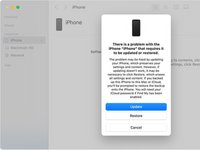
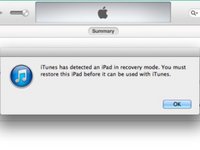
      • macOS Catalina及以上版本:打开“访达”并在侧边栏找到设备图标。点开就会出现“更新或恢复”弹窗。点击“更新”选项你的手机就会在不恢复出厂设置的情况下更新系统。如更新失败或者你需要解锁设备(忘记密码),选择“更新并恢复”选项就会抹掉该设备并更新系统到最新版本。

      • macOS Mojave以下版本或Windows系统:打开iTunes并在左上角找到设备图标。点击“更新”选项你的手机就会在不恢复出厂设置的情况下更新系统。如更新失败或者你需要解锁设备(忘记密码),选择“更新并恢复”选项就会抹掉该设备并更新系统到最新版本。

      添加评论

结论

要将你的iOS设备置于Recovery模式,请根据以下步骤操作,并且确保你有一台Mac或者已安装了iTunes的PC。

取消:我没有完成这个指南。

132等其他人完成本指南。

由衷感谢以下译者:

en zh

100%

整点没用的正在帮助我们修复这个世界! 您也想加入吗?
开始翻译 ›

Duckida

于02/07/20注册

2,510 声望

撰写一个指南

12指南评论

My power button is not working on an iphone 6, so I can't use these directions! Do you have a work around for this situation?

Thanks

Jeff

Jeff Lawton - 回复 分享

On iPhone 6, the power button is really only necessary to turn the device off. You can also accomplish this by disconnecting the battery. Which isn't ideal, but it's better than not being able to do it at all. After it's off, reconnect the battery, then hold down the home button and connect the lightning cable from the USB cable to your computer.

Alisha C - 回复 分享

Some repair tools can get the device into or out of Recovery Mode without pressing buttons physically. TunesKit iOS System Recovery has this feature for totally free, you can use this to put your iPhone into Recovery Mode without any limits.

pony King - 回复 分享

My home button is not functioning, so even if I disconnect the battery and reconnect it, I will be at the same place. I had to use the digital home button to use the phone before it got disabled. It's that white circular digital button that can be used as an alternative when the physical home key is not functioning.

Jeff Lawton - 回复 分享

My phone just suddenly off by itself an iPhone 12 Pro Max please I don’t know what to do

Amadi Divine - 回复 分享

添加评论

浏览统计数据:

过去 24 小时: 137

过去 7 天: 997

过去 30 天: 4,264

总计 221,184