跳转到主内容

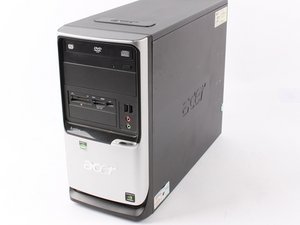
Budget desktop PC made by Acer, released in 2006.

Why is my desktop PC not sending signal to monitor?

My desktop PC powers on, but the monitor shows “No Signal.” The monitor and cables seem to be working fine because they display correctly when connected to another computer. I’ve already checked that all cables are securely connected and tried using different HDMI/VGA ports, but the issue persists.

The fans are spinning abnormally very fast and lights on the PC turn on, but there’s no display output. Could this be caused by a faulty graphics card, RAM issue, motherboard problem, or something else? What steps can I take to diagnose and fix this problem?

回答此问题 我也有这个问题

这是一个好问题吗?

得分 0
添加一条评论

1个答案

最有帮助的答案

Hi @titussteve78939

Try a full power refresh and check if that resolves the problem.

Here’s the procedure:

  • Disconnect the power to the PSU and then open the case and remove the RTC coin cell battery from its holder on the motherboard

When the battery is out, check its voltage. If it is <2.5V DC or if the battery is >4-5 years old, replace it. The battery model number is stamped on the battery e.g. CR2032 etc.

  • Press and hold the Power On button for a full 30 seconds and then release it.
  • Reinsert the RTC coin cell battery, (+ve on top as marked on the battery), close the case, reconnect power to the PSU and try to start it.

If it starts, there may be a message about the date and time being incorrect. This is normal as the above procedure has reset the BIOS back to its factory defaults. Once the date and time have been adjusted, the message won't appear the next time the PC is started. Any user defined BIOS settings that have been altered by you to suit your particular operating requirements will need to be changed back also.

这个答案有帮助吗?

得分 1
添加一条评论

添加你的答案

Titus Steven Chiumia 将永远感激不已
浏览统计数据:

过去 24 小时: 1

过去 7 天: 1

过去 30 天: 23

总计 51