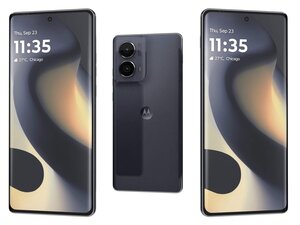

Phone won't charge past 16%, need new battery.
My phone recently started charging to only 16%, sometimes less. Need new battery? It's a Motorola Edge 2024 256GB

声誉积分: 10.1千
 191
191
 10
10
 46
46
Hi,
Under normal circumstances, NO, your battery should NOT be bad after less than 2 years, but it IS possible depending on use and charging habits.
Things that CAN cause it to die an early death are letting it discharge COMPLETELY before charging. Once can be all it takes... Charging it in a HOT environment or a very cold one, especially if it is used heavily at the same time. Use while charging should be minimized, and charging should NOT be done in a hot environment. Now, supposing it isn't a bad battery for a moment there are other possibilities.
Always, when something is wrong with your phone the first thing you should do is a "soft reset" which is simply turning it off, waiting a moment or several and turning it back on... This IS NOT just pressing the power button, waiting and pressing it again... that puts it into "standby" mode, waiting to get a call or for you to decide to use a game or whatever... Turn it completely off, then power it on again. This fixes probably 90% of the problems people have with their phones, even charging issues.
If that didn't fix it, check that your charging cable, charger and the charging port. (Be sure to also try a different wall outlet, just in case) try a different cable, a different charger and look into the charging port to see if it is dirty, linty, or clogged with animal fur, etc. If so, blow it out or pick it out with a non-electrically conductive device for example a toothpick (don;t be forceful and break anything) which leads to another possibility,... that it is ALREADY broken, check... is it loose or show signs of damage? (That's a different kettle of fish... but fixable). If you have a charging pad for it try that too, You can also try turning it off (completely) and plugging in the charger. if THAT allows it to charge fully, it tends to mean there is a software issue... your soft reset should fix most things but a poorly designed or malicious app could be to blame, try weeding out suspect apps, start with the ones you installed just before this began, though a malicious app may well 'lie doggo' for a while before being activated either automatically or remotely. Too, you can try updating your OS in case there are any fixes in the new version that may address the problem. In theory updating all your apps should keep the phone at it's best, in practice... not so much, some improvements are not for the consumer's benefit... so consider that when deciding which apps to toss or keep.
You can also check to see if your charger and/or cable work on a different device to help rule-out the need for a new one.
Last resort would be a "HARD RESET" (or Factory Reset) You don't want to do this unless you must because it returns the phone to an out-of-the-box state EXCEPT you will need to re-enter your Google login information to access the device after you do this or be locked out. Because this DELETES ALL of your data, make sure to back everything you want to keep before you do it. To hard reset, power off, then press and hold the Volume Down button and Power button simultaneously until the Android recovery screen appears. Now using the volume buttons scroll to "Wipe data/factory reset", Last, confirm by pressing the Power button.
Finally, if your phone is less than a year old maybe it is still under warranty and if none of the stuff above helps, I'd take it back and see if they can fix it. Or sell you what you need... or tell you what you need do you can look for it cheaper elsewhere...
Good Luck!
这个答案有帮助吗?
过去 24 小时: 0
过去 7 天: 4
过去 30 天: 7
总计 44
