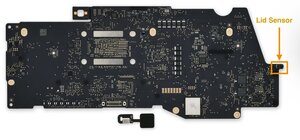

Intermittent Black Screen, Wakes Briefly Connected to Charger
I'm dealing with a very frustrating intermittent issue with my Late 2020 M1 MacBook Pro (Model A2338) - I have been using it for 4+ years and wondering if anyone has experienced this exact problem.
The Symptoms:
· Screen goes completely black at random times, but computer remains running (keyboard caps lock work)
· When black, NO image visible even with flashlight shining on screen
· Key clue: When screen is black, if I connect the charger AND press a key/trackpad, screen wakes up normally for 2-3 seconds, then goes black again
· Problem comes and goes randomly - might work fine for 2-3 days, then suddenly fails.
· Sometimes fixes itself after minutes/hours/days of not being used
· Screen angle has NO effect on the problem, I tried the lid at different angle during normal screen and during black screen issue.
What I've Tried:
· Multiple repair shops - getting conflicting diagnoses
· One shop visually inspected flex cables - reported no physical damage
· Shops suggesting: replace screen, replace Touch Bar (died 2 years ago), or possible logic board issue.
The Big Questions:
1. Has anyone had this EXACT pattern - black screen that briefly wakes with charger+key press?
2. What was the ultimate fix? Screen replacement or logic board repair?
3. Any known issues with the Late 2020 M1 Pro models related to this?
The intermittent nature makes it hard to diagnose. Any insights would be hugely appreciated!

 35
35  338
338  974
974