跳转到主内容
加入维修社区 - 创建账户

2015年3月更新的 13 英寸 MacBook Pro 配备 Retina 显示屏,型号为A1502,采用第五代英特尔酷睿 i5 和 i7 处理器,并配备 Force Touch触控板。

Incompatible screen for different A1502 models?

Hello,

I bought a late 2013 A1502 to change the screen of my early 2015 A1502, but now I see that the lid sensor doesn't work properly : the screen is off on boot, and only lights on if I close the lid.

Would someone be familiar with that kind of problem, and know if there is a way to make it work anyway? Thanks!

回答此问题 我也有这个问题

这是一个好问题吗?

得分 0
添加一条评论

2个答案

This is one of the risks of not using the proper part. Apple doesn't make ID'ing the system easy as the A# is not enough you need the year and some times even the sub ID value.

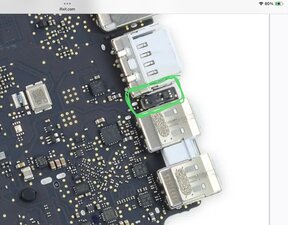
To fix this will require peeling the LCD panel out of the lid frame to then move the magnet into the correct placement to hit the Hall sensor held on the logic board if that's even possible.

Here's the location of the Hall sensor

Block Image

The risk of damaging the LCD panel is the gamble and I'm not sure the frame offers the needed cavity to move the magnet to meet the newer systems need. While not the same system here's a deep dive into the display assembly of a retina system so you can see this is not an easy task MacBook Pro Retina Display Teardown.

I'm sorry to give you the bad news. I wish I had a better one as these displays are still way to expensive even used!

这个答案有帮助吗?

得分 0

4条评论:

Hi, thanks for the input. I continued my search and I don't think that's the reason. If I use a magnet instead of closing the lid, it's the same thing (screen lights on when I put the magnet). I've found somewhere on reddit that the 2015 model didn't use the same video encoding, that the screen is taken as an external monitor, which would explain why it lights on when I close it (?) So maybe nothing to do with the sensor

完成的

@alsteingilbert - The displays backlight is controlled by the Hall sensor. Yes the display's interface spec was also changed here as well from iDP to eDP and that will explain the lack of image.

In either case not a workable display

完成的

So I have no idea how it is working but it is.

In the end I have a my A1502 2013 screen on a A1502 2015 body.

At boot the screen is black, I have to close the lid / pass a magnet once, and after that everything works just fine. Just hoping it will hold.

If you happen to have an idea to not have the display black on startup I'm interested ^^

EDIT : My mistake, it works fine when charging, when not charging, if I close the lid, display starts to dim then go back on, can't shut it down when not charging...

完成的

@alsteingilbert - That's the Hall Sensor issue

完成的

添加一条评论

Late 2012 > 2014 A1502 Models LCD's are 'different' to the 'unique' 2015 models LCD. 3.0 > 3.1 something.

Check the link for a MacBook screen compatibility list.

All Retina screen cables with hinges are compatible.

A1425 2012L 13" Retina could be tested with 13" or 15" 2013E Display. ⏎
Unfortunately, 2013/13" Display has different Camera connector.
For testing 13 and 15 inch screens of the same generation are compatible
2012-E2013 are fully compatible
L2013-2014 are fully compatible
2015 is unique

这个答案有帮助吗?

得分 0
添加一条评论

添加你的答案

Alstein Gilbert 将永远感激不已
浏览统计数据:

过去 24 小时: 3

过去 7 天: 9

过去 30 天: 39

总计 213