
跳转到主内容

Damaged a cable while removing bottom lid, A1989

Hi all,

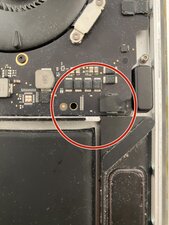
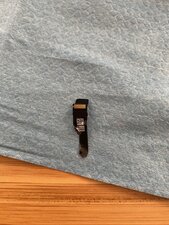
Was attempting to replace a battery on the A1989 and in the last movement to removed the case, I seem to have completely destroyed an unknown ribbon cable.

I’ve already been having a truly bad day, and have suspended this adventure until I understand what I’ve damaged, and if it’s fixable or I’m cooked for all time.

Photos attached, I appreciate your help!
Block Image
Block Image

Update:

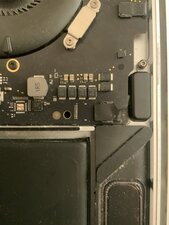
Sorry for the delay! Had a big (hopefully not MacBook related) migraine today. Here’s as close as I could keep it focus! To everybody at home, be careful taking your lid off, don’t be like Ian!
Block Image

Update 2:

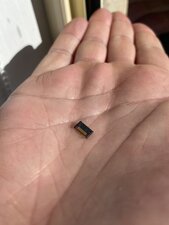
Just to double check, here’s a photo of the connector originally seated in the red circle.
Block Image
回答此问题 我也有这个问题

这是一个好问题吗?

得分 0
添加一条评论

1个答案

Well that Sucks! But it's not the end of the world. Jump to Step 25 in this guide MacBook Pro 13" Touch Bar 2018 Logic board Replacement to see the cable in question, then here's the speaker listing Speakers you need the Left major speaker.

这个答案有帮助吗?

得分 0

6条评论:

Thanks for your help Dan! On my example it looks like the connector the ribbon cable attaches to on the board has come off too, is it a simple fix to reattach this, or a bigger issue?

完成的

@ianadams - Ouch! Can you post a picture of the logic board area as tight as you can and in focus so we can see the traces.

完成的

Hey Dan! Updated my original post! Thanks for your help.

完成的

@ianadams - Almost! I think you only need a new speaker here. The connector within the red circle is the fragment you removed in the first image.

The logic board connector half of the connection was what I had suspected you had also damaged. So while we don't see it alone (still part of the logic board) I'll assume it is just fine here. Again refer to all the given steps images on how to unlatch the ZIF connection and then when you replace the speaker unit carefully rethread the ribbon's connector and that set the latch so it's secured within the Blue URL link to the guide I posted (Step 25). That should do it!

Now I do see a small area on the logic board just under where the speaker ribbon would sit is that just dust or is it damage?

完成的

Thanks so much for your help Dan. I’ve updated this with one last pic! The connector in my palm was originally seated where the red circle was.

Do feel like this is a big boo boo, but lemme know! This’ll be the last time I bug you, thank you so so much

完成的

显示更多的1条评论

添加一条评论

添加你的答案

Ian Adams 将永远感激不已
浏览统计数据:

过去 24 小时: 1

过去 7 天: 5

过去 30 天: 26

总计 96