

How do you teardown WHW03 V2 node?
How do you disassemble Linksys Velop WHW03 V2 node? The node has a constant weak signal no matter what (went through ALL troubleshooting steps) and is emitting a buzzing noise when powered on.

声誉积分: 521.1千
 11
11
 398
398
 1.5千
1.5千
Hi @onebadnode
If you haven't already done so, download and install this free WiFi tool and use it to check the actual signal strength of your WiFi network. It may be useful to know if it is a weak signal being produced by the node or if there's a reception problem somewhere in your house.
It shows all the WiFi networks that are visible to your device.
Note: Be aware that the signal strength shown by the program is in -dBm, so the higher the number, the lower the actual strength of the signal.
Here's an image that may help
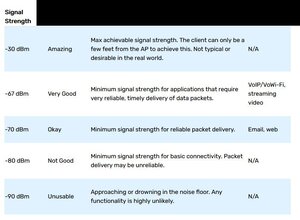
(click on image).
Try checking for the signal strength as close as possible to the node i.e. <15cm and check if the strength indicated is OK there. If it is it may be an antenna problem in your device and not the node.
If it is determined that the problem is in the node then unfortunately I can't find a teardown video for the node online so you may have to work out how to open it.
A humming sound emanating from an electronic device usually indicates a problem with the power supply in the device e.g. faulty filter capacitors
这个答案有帮助吗?
过去 24 小时: 1
过去 7 天: 5
过去 30 天: 26
总计 241
