
跳转到主内容

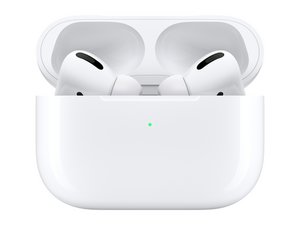
苹果第一代高端无线耳机的维修和拆解信息。发布于2019年10月。机型型号为A2084(左耳机),A2083(右耳机),A2190(充电盒)。

Pair button doesn't work

I got some second hand airpod pros but i cant get the pair button to work. they charge and everything and they are genuine. i cant get them to pair for the life of me, please help.

edit: the white pairing button doesn’t turn on when i press the button

回答此问题 我也有这个问题

这是一个好问题吗?

得分 4
3条评论

Are you following this guide?

https://support.apple.com/guide/airpods/...

完成的

@yukamoran yes, the white led wont even show

完成的

Did you solve it? I am having the same problem and just talked to Apple Support. They recommended to see the Genius Bar next week.

完成的

添加一条评论

9个答案

最有帮助的答案

When i had this issue i found a cheap case off amazon to pair with but here are the steps you can try to get them to pair,

Make sure your bluetooth is on when attempting to pair by holding down the button for up to 10-15 seconds if that does not work fully charge your airpods then open them up near any apple device with bluetooth on which should allow it to connect.

If this does not work what i did was buy a cheap case off of amazon to just pair them with the airpods themselves. this does work with all models but the case will be somewhat bad quality.

Hope this helped.

Link for the case : https://a.co/d/3QVUhEU

这个答案有帮助吗?

得分 1
添加一条评论

Hi,

so my headphones are paired and working again.

Thanks to Edelgard at the OEZ Apple Store, my AirPods Pro are working again. I am not sure whether this is the solution but here is what happened. My headphone case was checked and tested with another pair of AirPods Pro. Ultimately, the decision was: the pairing button is broken. However, when I put my own headphones back in again the LED started blinking white again. I was then able to pair the case with my iPhone again.

So, if you have the same problem and another pair of AirPods Pro at and, give it a try!

这个答案有帮助吗?

得分 1
添加一条评论

I have the same issue with AirPods Pro (gen1). I borrowed another case (but from airpods pro gen2), but they still wouldn't pair... So the case should be exactly from gen1?

这个答案有帮助吗?

得分 1
添加一条评论

Reset the AirPods first (not sure if you already did that). Hold the back button while the case is plugged in until the LED flashes amber. Keep holding the button until it flashes white.

If the LED doesn't respond, then the button itself is probably broken. And that's not going to be easy (or probably even possible) to fix. So, I would recommend getting a new case.

I am not a 100% certain that the case for AirPods Pro 2nd Generation or AirPods Pro 2nd Generation (USB-C) works with AirPods Pro 1st Generation. You should probably check into that before purchasing the case.

这个答案有帮助吗?

得分 1
添加一条评论

Use another case to pair them. Just borrow anyone’s case to pair them and don’t make the same mistake cause there is NO other way to pair and Apple will not help except Charge you $100 for a case or $250 for new ones

这个答案有帮助吗?

得分 0
添加一条评论

каробка не заряжается и если я положу наушники на каробку не выключается

这个答案有帮助吗?

得分 0
添加一条评论

Airport is not working and the power butten is also not working

这个答案有帮助吗?

得分 0
添加一条评论

you can try the following: keep the case on a charging cable to charge (the case should indicate that it is receiving power). Should the headphones have deeply run out of power put them in the case for 10 seconds take them out again and repeat this like two dozen times. A friend got their headphones to work again because in that brief moment of putting the headphones in, they received a bit of charge until eventually they had enough to register with the case again.

这个答案有帮助吗?

得分 0
添加一条评论

Everything is okay but they are not connecting with my phone I don't know why

这个答案有帮助吗?

得分 0
添加一条评论

添加你的答案

Charles Adamski 将永远感激不已
浏览统计数据:

过去 24 小时: 19

过去 7 天: 107

过去 30 天: 414

总计 25,214