跳转到主内容
加入维修社区 - 创建账户

发布于 2012 年 6 月, 型号 A1278. Intel 处理器,支持 Turbo Boost, 最多 512 MB DDR5 显存

Screen backlight not working

Hello,

I write to you today because it seems that i have a problem with my Macbook.

Indeed, there is no backlight (i tried to put a flashlight and the screen is fully fonctionnal) on my macbook.

I don’t really know if it’s the fuse or the lvds connector or the lvds cable.

I didn’t check with a multimeter if it’s the fuse.

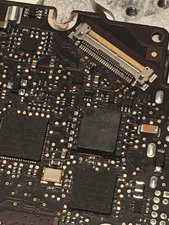
I join a picture of the connector.

Block Image
Block Image
Block Image

But some pins are not clear, and i’m not really expert about it, all i know it’s that i can fix that, but i need some review of more experimented person than me.

Thanks for your answers,

With luv <3

Update (09/30/2019)

Thanks for your answer,

I tried to do my best!

Block Image
Block Image
Block Image
Block Image
Block Image
Block Image
Block Image
Block Image
Block Image

I take pictures from my iPhone, and it’s an old iphone so the quality is not the better, sorry.

Mise à jour (02/10/2019)

Hello back,

After some checking, i saw that the fuse is dead :(

已回答! 显示答案 我也有这个问题

这是一个好问题吗?

得分 0
添加一条评论

2个答案

已选择的解决方案

On those images for the first 3 or 4 pins of the display connector starting from the left are badly corroded / damaged.

On those pins if you follow the line trace you'll see burnt components which are related to the backlight circuit.

The screen connector may need to be replaced and a few components on the backlight circuit need to be replaced. How does the screen connector on the cable side look like?

It should look shiny and clear meaning the screen is most likely still OK.

To get this fixed you'll have to take it to a reputable local repair store that does board repairs / microsoldering on macbooks. I'd estimate at least $150 for this repair.

这个答案有帮助吗?

得分 3

1条评论:

Thanks for your answer, the connector is very clear, and yep I saw that the circuit is burned, but this is not from yesterday and was in the same state a year ago.

for the repairs I have all that I need at home so I will try to replace that.

Tomorrow I will try to check tension on fuse P.

Thanks for your answer ♥️

完成的

添加一条评论

@gheeks - Your image is a bit rough as its not crisp enough to tell whats happening. Let’s take a soft paint brush and carefully scrub the logic board loosing the dust and debris and then use some can’ed air to blow it away.

You do appear to have a bad solder joint (burnt?) on one of the SMT components (second one up from the bottom) The PCB covering is also missing (exposed copper).

The fuse is either marked with a P or a Dot, and is near the connector just to the left where your image ends.

After cleaning the dust off take another picture focused on the connector again so we can see the lower area more clearly. Increase the light (higher speed and aperture is smaller for better depth of field) and use a mounted camera so your body shake doesn’t blur it. Take another showing the left side a bit more so we can see the fuse and the logic board over their as well

这个答案有帮助吗?

得分 2

1条评论:

Looks like you had a short in the line as the component overheated (burnt) and the copper trace likewise overheated. Replacing the resistor likely won't fix this until you verify the cause of the short is removed.

I think the best thing is to find a local repair person who has the skills to fix your system.

完成的

添加一条评论

添加你的答案

Loïc 将永远感激不已
浏览统计数据:

过去 24 小时: 1

过去 7 天: 5

过去 30 天: 10

总计 226