跳转到主内容
加入维修社区 - 创建账户

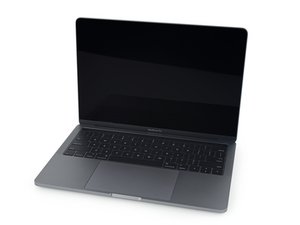
A1706/EMC 3071—于2016年11月上市,这台13''MacBook Pro带有OLED触摸条。以双核“Skylake”英特尔酷睿i5 CPU和4个雷电3端口为特征。

Bootcamp / computer is completely broken.

I am completely lost here I don’t know what’s happening. I am attempting to install windows using bootcamp but at first I had an issue where my disk could not be partitioned. I gave up trying to fix it so I just reset the Mac drive back to a fresh install of Mojave. It then worked but when restarting there is nothing there, holding alt shows no bootcamp drive. Bootcamp is detected in disk utility so i’m not sure what’s happening. although it says only 125mb is used which I find kinda odd (used space on the drive)

So I tried making a bootable usb, that didn’t work either and it doesn’t come up if I hold alt.

I installed rEFInd incase it was a boot issue but that doesn’t show it either.

I thought it might be an APFS issue so I reverted to Sierra. Still the same issue but it did come up on alt but then the splash screen would come up, nothing after that.

ost

Im lost and need to get this working ASAP.

Things I have tried troubleshooting

  • Resetting NVRAM
  • resetting PRAM
  • trying older version of windows iso (1803)
  • trying different usb
  • reinstalling Mac again
  • multiple attempts at wiping Mac drive clean
  • multiple attempts at re-trying bootcamp but it still seems to give me either a different issue each time or just does the same thing where it gives me a useless partition..

This is super frustrating I don’t know what else to try. My LCD is broken so i’m using the Mac in clamshell mode (my phone slid down the laptop and hit the flex cable, another story)

BUT this has never been an issue as I have installed multiple windows bootcamp instances over the last few months and its never been an issue.

回答此问题 我也有这个问题

这是一个好问题吗?

得分 0
添加一条评论

1个答案

最有帮助的答案

Oh Boy!

While I know this is a bit of a left turn bear with me! What is the status of your internal display? Post a picture if that helps 在已经存在的问题里加入图片.

Apple does have a extended warranty repair program for your system for display issues. Maybe you can sneak it in under it 13-inch MacBook Pro Display Backlight Service Program

While it may sound odd, once you get your system back they will help you in setting up your system at the Apple Store. So plan for lots of time and bring all your stuff (TimeMachine backup)! I promise you they will spend the time to get you going.

Update (09/22/2019)

OK, here’s the needed part 13” 2016~2019 MacBook Pro Touch Bar & Function Key Chin Plate and here’s what you’ll need to do to replace the chin bar MacBook Pro 15" Touch Bar 2017 Replace LOGO Baffle on the screen,替换屏幕底部LOGO挡板 Replacement Its the same process as your 13” model

iFixit图片

指南

在已经存在的问题里加入图片

难度:

非常容易

2 - 5 minutes

MacBook Pro 15" Touch Bar 2017 Replace LOGO bezel on the screen,替换屏幕底部LOGO挡板图片

指南

MacBook Pro 15" Touch Bar 2017 Replace LOGO Baffle on the screen,替换屏幕底部LOGO挡板 Replacement

难度:

简单

10 - 30 minutes

这个答案有帮助吗?

得分 1

2条评论:

That's what I was thinking I hope it can get through even though flex gate wasn't the issue haha. I can't seem to attach an image but basically near the right of the MacBook Pro logo is a decent crack. No cracks on the LCD and its completely black, only gets blacker with brightness turned up no colours etc can be seen. Ill book an appointment and try it out I'm guessing that's my best shot.

完成的

Ouch! We can get the chin bar replaced without involving Apple which I would do first. Not sure if you're going to be so lucky with the display though. Going to an authorized service center would likely be better for that as they can sometimes sneak things through.

完成的

添加一条评论

添加你的答案

Zlatko Damcevski 将永远感激不已
浏览统计数据:

过去 24 小时: 0

过去 7 天: 1

过去 30 天: 9

总计 823