
跳转到主内容

Repair and disassembly guides for Brother printers.

Printer DCP-L2520D automatic switch off

The above printer is getting switch off automatically.

回答此问题 我也有这个问题

这是一个好问题吗?

得分 0
添加一条评论

2个答案

最有帮助的答案

If the "Auto Power-Off Time" option is set, the machine will power off after it has been idle for the selected time period. Follow the instructions below to disable this option, by setting the "Auto Power-Off Time" to 0 minutes.


For Windows:

  1. Connect the printer to the computer and turn the printer on.
  2. Open the [Devices and Printers] window.

See “How to open the Devices and Printers window.”

  1. Right-click on the printer name and click [Printer Properties].
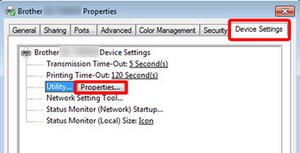
  2. Select the [Device Setting] tab and click [Properties], which will appear after you click [Utility].

#

Block Image
  1. Set "Auto Power-Off Time Setting" to 0 minutes, and click the [Apply] button.

#

Block Image

#

  1. For Macintosh:
    1. Connect the printer to the computer and turn the printer on.
    2. For macOS 10.13/ 10.12/ Mac OS X 10.11/ 10.10 Users:

Download Printer Setting Tool from the [Downloads] section of this website http://support.brother.com/g/b/downloadt...

  1. Click [Macintosh HD] - [Applications] - [Brother] - [P-touch Utilities] - [Brother xx-xxx Utility].
    1. Set "Auto Power-Off Time Setting" to 0 minutes, and click the [Apply] button.

##

Block Image
  • The initial "Auto Power-Off Time Setting" is 60 minutes.
    • For network models, this setting is disabled when connecting with wired network/ wireless network.

这个答案有帮助吗?

得分 1
添加一条评论

Is is set to sleep or power off after inactivity?

read the manual at

http://support.brother.com/g/s/id/htmldo...

and confirm that this unwanted power down is not due to the user setting in operation.

这个答案有帮助吗?

得分 0
添加一条评论

添加你的答案

ELECTRONIC AUTOSTAT MFG. CO. 将永远感激不已
浏览统计数据:

过去 24 小时: 0

过去 7 天: 2

过去 30 天: 5

总计 307