
跳转到主内容
加入维修社区 - 创建账户

2.0GHz, 2.3GHz, or 2.6GHz quad-core Intel Core i7 processor (Turbo Boost up to 3.8GHz) with 6MB shared L3 cache.

MacBook Pro doesn't charge, no light.

I have for a while had some issues with my Macbook Pro (A1398, EMC 2674), it rarely wants to charge. When i plug the magsafe connector in i don't get a light. Under system information it says:

Battery condition: Normal

AC Charger Connected: No

AC Charger Charging: No

Even thought it is connected, but there is no light on the magsafe plug, and it doesn't charge. Sometimes i could get away with resetting SMC and sometimes the light comes back on. But now it stopped all together. I can still make it work sometimes by rapidly disconnecting and connecting the magsafe plug, then the light comes back on.

My first thought was that the charger was broken, so i tried 2 different Macbook Pro chargers, and they don't work either. Then i went searching on google for possible issues, and decided to change the DC-Board to a new one, and it still won't charge sometimes.

TL;DR: No magsafe light, tried other chargers, changed DC-Board and still sometimes it wont charge.

Block Image
回答此问题 我也有这个问题

这是一个好问题吗?

得分 0
添加一条评论

2个答案

最有帮助的答案

Review this Apple T/N to inspect your charger and within it there's a link to a second T/N that will guide you to a new charger. Be careful! As there are quite a few knockoff's that would hurt your system! While it's likely to cost more I would only get the real one directly from Apple: Apple Portables: Troubleshooting MagSafe adapters

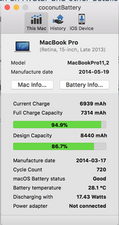
I would recommend you get this great little app: CoconutBattery. It will allow you to see the health and number of recharge cycles your battery has had as you still may need a new battery here. Paste a screenshot of the main window of the app here for us to see 在已经存在的问题里加入图片

Sporadic charging are difficult problems to diagnose. Did you get your system wet or have a spill of something into the keyboard or trackpad areas? Or, sit the system down on a wet surface? Liquid damage is a common issue with many that have this type of problem.

Update (04/11/2018)

Well your battery is getting long in the tooth with 720 recharge cycles.

You tend to run your system hard as this is a lot of cycles in its lifetime thats about 130 cycles per year! Keep in mind these are when you fully discharge the battery (less than 10%) that the system needs to do a full recharge.

Time for a new battery!

这个答案有帮助吗?

得分 2

7条评论:

As i've written in my question, i have already tried other chargers and already replaced the Magsafe DC-Board in my laptop, this has not helped.

完成的

Thomas, You're to quick I was still writing!

I have some answers pre-written which I was compiling together ;-} Re-read what I wrote.

完成的

Sorry, i don't believe i have spilled anything on it or placed it in something wet, i have had the macbook open and looked inside, nothing seems to have gotten moisture. I have also added a picture from CoconutBattery.

Thank you for your time.

完成的

Thank you for updating your answer, yes the battery is getting pretty old. So the battery is at fault with the Magsafe not charging? There isn't even any light in the magsafe when i connect it. And it's not even getting power from the wall, it's as if something is not allowing the magsafe to connect. I just really want to be sure to as if it is the logic board or the battery that is at fault before i go and purchase new parts. Thank you again!

完成的

Then it sounds like your MagSafe charger is bad as well here.

完成的

显示更多的2条评论

添加一条评论

@Thomas, any progress on narrowing down what on the logic board it could be? Got the same issue on same model!

Because my fans spin normal but macbook only turns on randomly (it seems to get worse) even only running on battery with no charger plugged in, I suspect a GPU or CPU issue and try refluxing those two after the new battery is installed next week.

这个答案有帮助吗?

得分 0

1条评论:

@cmuede - I would hold off refluxing things as you're more likely to make things worse!

There is a bit of circuitry which controls the charging of the battery something within it needs attention. You'll need to find the schematics and using a DVM do some testing of the logic board. For most people is is beyond their skills and besides you'll need to find the needed parts and have the micro-soldering skills to solder the new parts in.

完成的

添加一条评论

添加你的答案

Thomas Egelund 将永远感激不已
浏览统计数据:

过去 24 小时: 0

过去 7 天: 5

过去 30 天: 17

总计 8,696
