
跳转到主内容

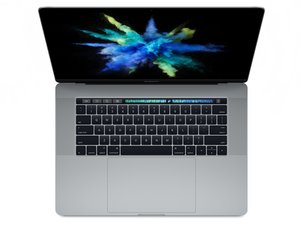
模具型号A1707。于2017年6月上市,这台MacBook Pro的特征为配有Kaby Lake处理器,可升级至2.9GHz、可动态超频至3.9GHz四核英特尔酷睿i7处理器。

How to clean the keyboard

I have spilled some Coca-Cola on my keyboard. I am trying to clean it so I removed the key caps. For some reason when I put back the key caps they do not spring back.

1. How do I remove also the butterfly mechanism? Can it be removed?

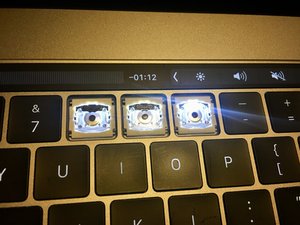
2. On the key "0" (zero) as you can see in the picture, because I used some compressed air there is some missing black plastic and now my LED is brighter than the others. How can I glue the plastic back. I have some E6000 glue available.
Block Image
已回答! 显示答案 我也有这个问题

这是一个好问题吗?

得分 2
添加一条评论

1个答案

已选择的解决方案

Hi Popescu,

The black plastic you were talking about is very delicate, and same thing happened to me, I removed my T key when I was cleaning it and the black plastic broke off, and when I removed the T key there were little hooks that I didn’t realise and those broke, so when I tried to put it back on, it wouldn’t click.

And yes my T key is brighter than the rest now unfortunately.

Also as you said before how you put the keys back on and they wouldn’t click could be because the hooks most likely have been damaged.

So for me when the T key didn’t click in and was loose, I went onto ebay and bought a new T Key and that did the trick, but the T is still brighter than the rest.

https://www.youtube.com/watch?v=kh88cn_r...

this is a useful link on how to clean and remove the butterfly mechanism.

这个答案有帮助吗?

得分 0

1条评论:

That YouTube guide is for Scissor keyboard mechanisms (2015 and earlier). The 2016-2019 Butterfly keyboards are completely different and the keys are MUCH more difficult to remove without breaking.

完成的

添加一条评论

添加你的答案

[deleted] 将永远感激不已
浏览统计数据:

过去 24 小时: 0

过去 7 天: 6

过去 30 天: 13

总计 2,897