
跳转到主内容
加入维修社区 - 创建账户

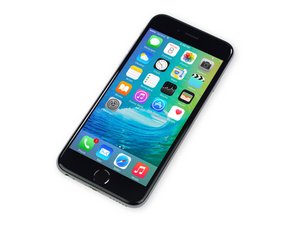
苹果官方于2015年9月25日正式发售iPhone6S A1688/A1633机型。 此机型的修理方式与先前几代差不多, 需要螺丝起子及撬棍工具。 同时也适用GSM or CDMA/16, 64 or 128 GB/ 银色, 金色, 深空灰色, 玫瑰金色等机型。

iPhone 6s Home Button Replacement

Everytime one of my customers need a home button replaced for an iPhone 6s I'll install the button but when putting the bracket over it with screws it seems to be so tight where the button won't click. I've tried loosening the screws a little as well. I confirmed the issue isn't my screens or home buttons because I'll install button on the Apple screen and try different buttons from different suppliers to test but the same thing happens. Only thing seems to work is a new brackets to cover the home button and then it clicks just fine. Anyone know why this happens and how to get original bracket to work?? I never have this problem with other models

已回答! 显示答案 我也有这个问题

这是一个好问题吗?

得分 0
添加一条评论

2个答案

已选择的解决方案

Here's a hot tip. With any home button metal bracket you have you will just need to adjust the concaveness of the metal bracket as shown here:

Block Image

So the objective is to get a balanced level of the above just enough that it makes the home button feel like original position when you press it. e.g the metal bracket needs to be further away from the home button to give it more space for clicking.

Flex accordingly to make it press properly. Feel free to get the two screws for the metal plate screwed in, just don't overtighten of course.

I bend the middle part of the home button in with my fingers

On every screen replacement I usually just bend them inwards to home button to make it feel like a how the home button should feel closest to when it was never repaired on original screen. With replacement home buttons you will have to do the opposite of that.

这个答案有帮助吗?

得分 3
添加一条评论

This worked, thank you!

这个答案有帮助吗?

得分 0
添加一条评论

添加你的答案

Nerdchikk 将永远感激不已
浏览统计数据:

过去 24 小时: 0

过去 7 天: 2

过去 30 天: 6

总计 592