
跳转到主内容
加入维修社区 - 创建账户

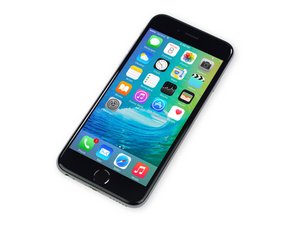
苹果官方于2015年9月25日正式发售iPhone6S A1688/A1633机型。 此机型的修理方式与先前几代差不多, 需要螺丝起子及撬棍工具。 同时也适用GSM or CDMA/16, 64 or 128 GB/ 银色, 金色, 深空灰色, 玫瑰金色等机型。

Several problems after trying to replace iPhone speaker

So I recently followed the guide for replacing the speaker in an Iphone 6s. Not only did I think everything went smoothly but it almost seemed surgical. Used every proper tool, every screw and component was kept track of, and I didn't force my way through anything. Although after booting there seemed to arise several strange problems.

1. During the first boot after the installation, the phone was stuck on the apple logo which I was able to get out of by hard resetting. Weird, but didn't think much of it.

2. For a few hours the phone was working flawlessly but then it stopped charging at a certain point. I tried different cables and outlets but nothing has worked so far. Now it only charges when the phone is off.

3. In addition, even when the battery does charge, it loses its battery extremely quickly.

I find this to be very strange considering I didn't even touch the charging port, or the battery for that matter.

CAN SOMEONE HELP ME OUT PLEASE

已回答! 显示答案 我也有这个问题

这是一个好问题吗?

得分 1
2条评论

Just for clarification.

Was it the top earpiece speaker on the screen or the bottom loudspeaker connected to the charging port?

Do the charging cables plug in fully into the port?

If not then there is most likely debris inside the charging port that needs to be cleaned. You can use a tooth pick or straight pointy tweezers to clean it out.

Just make sure you don't bend the charging pins left to right, they can be pushed down slightly.

完成的

It would be the bottom loudspeaker connected to the charging port. And yes it seems like the cables go fully into the port.

完成的

添加一条评论

1个答案

已选择的解决方案

When working on iPhone 6S and 6S plus, you need to discharge the phone, after you've removed the cables, before you put them back on. It's very possible you've damaged something. I don't think it's a board problem, which is good. It's likely that you've damaged the battery and or the Lightning dock. I talked with the folks at iFixit to put some kind of a warning....

Update (02/06/2017)

Obviously you haven't worked on an S model. Sorry, meant to write it in my post. You need to hold down the power button. Again, after you remove the display and power cables, before you put them back on

这个答案有帮助吗?

得分 1

9条评论:

What do you mean by discharge? Does that mean wait until they have no power? Also I just wanted to mention I didn't really even touch the battery except when disconnecting its connection to the board. Is there a way to know which one? Because it does charge, but only when it's off.

完成的

You do not need to discharge the phone. I've fixed thousands of them and never even heard of something so silly

完成的

What do you think the issue could be?

完成的

I've fixed 2 6s and a 6s plus just today.

I have never once discharged an iPhone 6s and I've fixed over 150 of them last year alone with almost no issues

完成的

Same here. I've never done it on 6s and higher yet.

I've even plugged in a iPhone 6 display while the phone was on which was dumb of me. The phone recalibrated itself by doing a soft reboot.

Honestly discharging the phone is the same as like wearing an ESD strap to build a computer. ESD seems to 99% of the time never been an issue when it comes to building computers.

I'm pretty sure any flagship phone is designed to discharge itself quickly after battery unplug. Literally just 3-5 seconds of just waiting there is enough already.

完成的

显示更多的4条评论

添加一条评论

添加你的答案

Michael Shkatov 将永远感激不已
浏览统计数据:

过去 24 小时: 0

过去 7 天: 1

过去 30 天: 5

总计 107