iPhone vibration doesn't work after disassembling
I disassambled my iPhone 3G exactly like you were showing in repairguide but when I switched it on the vibrator wasn't working. It seems that there is nothing wrong with software.

声誉积分: 1
 1
1

声誉积分: 77.4千
 360
360
106
 146
146
check the vibrate motor pins haven't been flattened when you opened phone, if they aren't making contact with underside of motherboard gently prise them up a little
clean contacts on vibrate/motherboard
check the 2 small metal prongs on metal housing of motor are in the slots of rear case
check small plastic switch is seated in slot of mute on/off switch.
failing that you may have to replace connector 6 or vibrate motor
这个答案有帮助吗?
Hey!
So I have the same problem. I changed the battery of my iPhone 5S but now it won't get in silent mode when I use the little side switch above the volume buttons. However, when I get a text/call it will ring and vibrate so the motor is fine. It seems like it's more of an electronic issue. Do you have any idea how to fix that?

Hello i did follow the procedure as explained on the website.
Before finishing cloqing the vibrator works perfect
but when i close completely the screen then it makes a strange sound and then stop.
If i try again when opening the vibrator works again.
Would you have an idea what's causing the problem?
这个答案有帮助吗?
i would check that you have the vibrate motor in the back case properly. it has a metal cover with 2 small prongs on the side (not the contact "springs"!) which sit in 2 slots in the back case. they are hard to see but if the prongs aren't in then the vibrate motor may be sitting proud and this may be why the spinner makes that noise.
When you talk about prongs do you mean putting the screws on the "rear panel holding the vibrator" fixing to the back case cover?
or do you talk about something else?
no, I mean the 2 very small prongs on the vibrate motor cover that hold it onto the rear case... before you put the motherboard in.

i have the same problem and i think a short circuit is created as i am closing the housing it stops working just millimeters away from closing the screen on the housing its very weird
is there pictures that we can look at or maybe a circuit map?
这个答案有帮助吗?
take a look at my comment above. you may not have seated the motor properly and when you put the motherboard in it is stopping the spinner from spinning..
the motor does vibrate fine its just as soon as some sort of contact is made with the glass cover that makes the motor not respond anymore
as i was closing the housing i kept on testing the vibrate motor by switching the mute button from on to off, it kept on responding fine untill i was almost closing the housing
the motor is not blocked that i am sure about
i can only assume that the motor is NOT in properly hence when you close the glass it puts pressure on the motor stopping it from spinning. you really need to take the motor out and reassemble, making sure that the cover for the motor is properly in its seat with the cover prongs int the rear case.

This happened to me and removing the strip of padding on the back of the LCD housing fixed it. Even the slightest obstruction and that motor won't spin..
这个答案有帮助吗?
I had this for-mentioned issues, would work right up until the screen finally clicked into place,
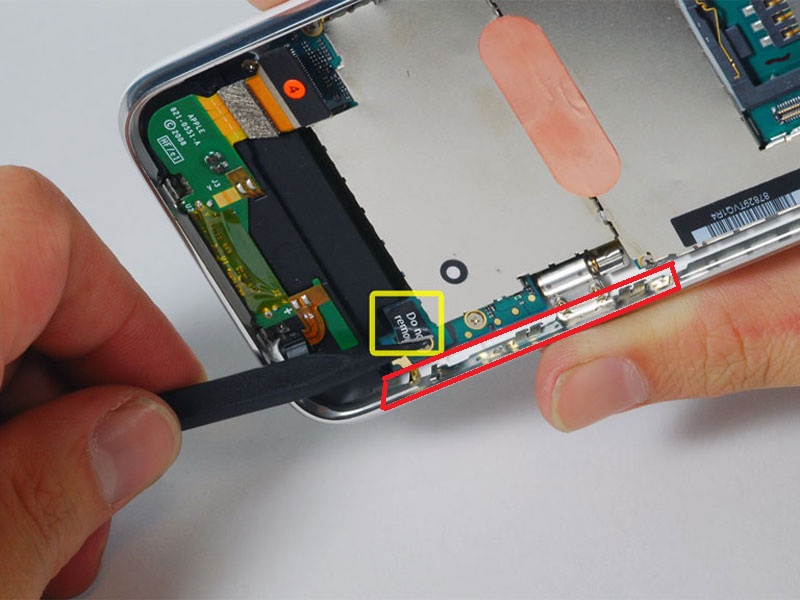
I placed a small piece of electrical tape along the wall where I have marked in red, carefully replace the screen and it should be ok.
这个答案有帮助吗?
过去 24 小时: 0
过去 7 天: 0
过去 30 天: 12
总计 5,074