
跳转到主内容

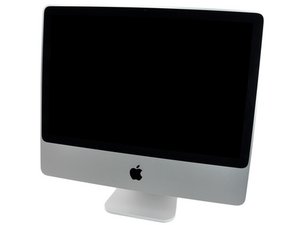
Model A1225 / Mid 2007 and Early 2008 / 2.4, 2.8, or 3.06 GHz Core 2 Duo processor

HDD to SSD and new Optical Drive

Hi everyone,

I'm new to this forum but it seems that you know a lot about replacement procedures and hardware stuff. So, I've got my iMac since 2008 and I'm still very happy with it running OS X 10.10.5. However, my optical Drive "Superdrive MATSHITA DVD-R UJ-875" doesn't work anymore since a long time and I always wanted to replace this one.

In the same time, I'm thinking about replacing my HDD to an SSD too in order to become a faster Computer. My HDD is a "Hitachi HDP725032GLA380" with 320GB.

My questions :

Do you have replacement procedures for my HDD and Superdrive ?

Which SSD/Superdrive will work in my system ?

Where can I buy them ?

Thanks a lot for your help!

Pedro

Update (02/04/2016)

Hi,

Thanks for your quick reply. I was looking to this drive : Seagate Desktop SSHD 1TB - ST1000DX001

and wondering if this would work with my iMac ? I'm kind of inexperienced with these SSD/HHD two in one Drives. How much of Flash memory is in there ?

For the optical drive I'll probably replace this one too, but can't find the one that will work..

Thanks again for your help.

已回答! 显示答案 我也有这个问题

这是一个好问题吗?

得分 -1
2条评论

Here's the Seagate spec sheet: Desktop 3.5" SSHD. If you look at the line SATA Transfer Rates Supported (Gb/s) You'll see your systems HD SATA port speed is present: SATA II (3.0 Gb/s). So it will work in your system. When you take your old HD out make sure to transfer the thermal sensor over to your new drive.

完成的

添加一条评论

1个答案

已选择的解决方案

Hello and welcome.

If you go to this link

iMac Intel 24" EMC 2134 and 2211

You will see 7 replacement guides. 2 of these guides explains exactly how to replace the Hard Drive and the Optical Drive.

As for SSD im sure they are all standard there is no special one needed for your 24" imac, just have to make sure you place the HD temp sensor back on the new SSD drive before closing it up (HD procedure will show you as well). If you buy a smaller form factor hard drive like those found in laptops, you will need to by an adapter for it that is designed for your imac. Best thing would be to buy the same form factor size hard drive to avoid buying an adapter.

As for your optical drive once you open up your imac you will see what model number is printed on the optical drive than you can do a search to buy that particular optical drive.

You can find most products on iFixit, retail stores, ebay....etc

iMac Intel 24" EMC 2134 and 2211

这个答案有帮助吗?

得分 2

2条评论:

Follow Mikes link above to get to the IFIXIT guides. One rub you have here is your current HD is a SATA II (3.0 Gb/s) so you'll need to find one that is able to run at this speed if you plan to swap out the HD for the SSD. Not all SSD's work at this slower SATA standard so make sure the spec sheet for the drive lists it.

完成的

Your Optical drives interface is PATA which is slower than SATA I (1.5 Gb/s) so you don't want to swap out the optical drive for a SSD as you'll end up loosing all of its benefits.

完成的

添加一条评论

添加你的答案

Pedro Gomes 将永远感激不已
浏览统计数据:

过去 24 小时: 0

过去 7 天: 0

过去 30 天: 0

总计 256