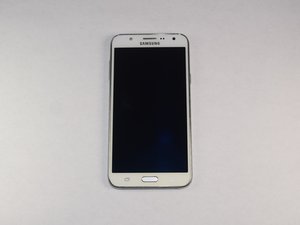
学生贡献的维基
此维基页面由我们教育项目的学生团队编写。
屏幕闪烁
屏幕不断闪烁,时亮时灭。
显示设置不正确
你的手机设置可能需要更新。要更新手机,请从主屏幕进入“设置”选项卡。选择“显示”。选择“更新”。
进水损坏
你的手机进水了。水会损坏电子元件,并可能已损坏了显示屏排线。要修复设备的显示屏,请参考屏幕更换指南。
柔性排线或连接器可能松动
你的手机可能跌落过。频繁跌落可能导致柔性排线松动。
设备无法开机
你的设备无法开机。屏幕呈黑色。
电池没电
你的电池电量已耗尽。请插上电源为手机充电。
电池松动
你的电池松动了。请更换电池。如需更换电池,请前往对应指南。
设备屏幕无响应
按下设备电源按钮后屏幕没有点亮。
屏幕破裂
此问题很可能是由跌落造成的。为解决此问题,你可以联系 Samsung 或附近的维修店寻求屏幕更换帮助。另一个修复方法是购买一块与此手机匹配的新显示面板。如需更换屏幕,请参考屏幕更换指南。
屏幕未连接至主板
屏幕连接到主板的连接器可能松动了。为解决此问题,你可以联系 Samsung 或附近的维修店寻求更换帮助。另一种方法是打开手机并重新连接屏幕与主板。如需更换屏幕,请参考屏幕更换指南。
设备无法通电
开机时屏幕保持黑色,且没有任何指示灯亮起。
为你的设备充电
你的设备可能没电了。使用适配的充电器插入设备,充电 15 分钟。如果按住电源按钮 15 秒后设备仍无法开机,可以尝试更换充电器或充电口。
接口内积聚碎屑
充电口或充电器内可能积聚了灰尘。要解决此问题,尝试向充电口和充电器的入口吹气。
电池或其他硬件部件松动
随着使用时间的推移或多人使用设备,内部组件可能会松动。请使用合适的工具打开设备并拧紧所有硬件连接。
设备音频失真
设备发出的声音混乱、失真或无法正常工作。
设备误以为处于耳机模式
尝试将耳机插入耳机插孔几次。有时设备会误判自身处于耳机模式,此举可刷新手机状态,从而退出耳机模式。
设备进水
尝试将设备放置在桌面上,24 小时后再检查音频是否恢复正常。这有助于设备干燥。
设备扬声器损坏
更换手机内部的扬声器。打开手机后盖,取出电池,使用 Phillips 螺丝刀拧下所有十颗螺丝。取出扬声器,然后安装新扬声器。
主屏幕按钮失灵
主屏幕按钮无法按下,或者按压后屏幕没有反应。
按钮错位
主屏幕按钮在物理上发生了错位,或者看起来歪斜。
按钮卡住
在某些情况下,按钮可能会变脏或堆积污垢,导致其卡住而无法继续工作。
线缆断开
连接主屏幕按钮与主板的排线之一已断开,需要重新连接才能正常工作。如果设备进水,也可能导致这些排线损坏。
音量按钮失灵
音量按钮无法按下,或者按压后音量没有降低。
音量键错位
音量按钮在物理上发生了错位,或者看起来歪斜。
按钮卡住
根据使用环境的不同,音量键可能会变脏或堆积污垢,导致其卡住而无法继续工作。
线缆断开/损坏
连接音量键与主板的排线已断开,需要重新连接才能正常工作。如果设备进水,也可能导致开关或排线损坏。


78条评论
How to reset my face recognition
Jimmy Cline - 回复 分享
No one can hear me on phone calls.if i use Bluetooth or speakerphone they can.i need help. I've tried everything i find on Google. Nothing has worked
Brandon Summerlin - 回复 分享
Phone worked fine I put it on the charger now it will not charge…I know it's not the chargers..it will not charge at sll
donnaw - 回复 分享
My phone was working great and I turned went into Google play and started a song when I pressed the power key to turn screen back off it had no affect. I tried repeatedly and nothing. I just let it be and then probably within 20 to 30 min the phone powered off, not sure if it was actually dead or just powered off. I assumed it died so I put it on charge but it wouldn't charge. Tried different chargers and also checked to make sure the chargers were working and they were. I let it sit for a couple hours not hooked up and then tried again the charge symbol did come up but not for too long I think it charged to 4% but never would turn on. I started looking at forums that addressed these issues and ine said to press volume down and home then power key. I did then got warning about custom os and its stuck on that screen. I've tried pressing all the buttons and none of them seem to have any affect. Please help!
angelacapko - 回复 分享
hi there,
did you find any solution?
it also happened to me yesterday while i was using instagram and suddenly my phone(j7 Prime) hanged and i pressed power button to try lock/unlock but once the screen went off, since then it is not getting on. even it dosn’’t show the charging led. if you had have any solution then plz mention here
Faisal Mahmood - 回复 分享