跳转到主内容
加入维修社区 - 创建账户

iPod Nano 6th Generation Clip Replacement

浏览量: 9.1万

View statistics:

Past 24 Hours:
5
Past 7 Days:
41
Past 30 Days:
158
All Time:
90,894
评论: 16

16 comments on steps.

已完成: 27

27 people have marked this guide "completed." Will you be next?

收藏: 14

14 people have favorited (and subscribed to) this guide. Will you be next?

所需时间: 没有估计
难度: 中等
iPod Nano 6th Generation Clip Replacement

Use this guide to remove your Nano's belt clip.

你所需要的

工具

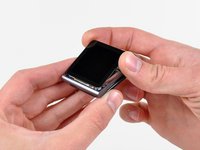
    1. iPod Nano 6th Generation Clip Replacement, Front Panel Assembly: 步骤 1 中的图像 1,1
      • Use a heat gun or hair dryer to soften the adhesive securing the perimeter of the front panel assembly to the outer case.

      • Be careful not to overheat the front panel assembly, as it may result in damage to the LCD.

      添加评论

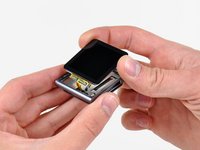
    2. iPod Nano 6th Generation Clip Replacement: 步骤 2 中的图像 1,1
      • While the front panel is still warm, use the edge of an opening tool to pry it from the headphone jack side of the front panel assembly out of the Nano.

      • Do not attempt to pry out the front panel assembly from, or insert the opening tool into the left side of the display, as the display data cable is right underneath and may be damaged in the process.

      • Continue prying the perimeter of the front panel assembly out of the outer casing, being careful not to damage the display data cable held under its left edge.

      • If the front panel is excessively difficult to lift out of the outer case, reheat the area and try again.

      添加评论

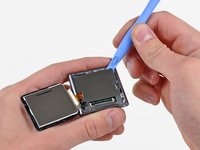
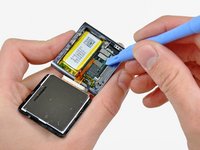
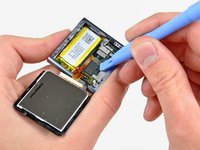
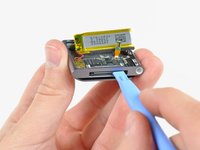
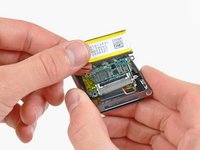
    3. iPod Nano 6th Generation Clip Replacement: 步骤 3 中的图像 1,2 iPod Nano 6th Generation Clip Replacement: 步骤 3 中的图像 2,2
      • Lift the front panel assembly from the headphone jack side of the Nano.

      • Pull the front panel assembly slightly away from the left side of the Nano to clear the display data cable.

      • The front panel assembly is still attached to the Nano by two cables.

      询问修复机器人

      添加评论

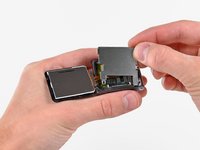
    4. iPod Nano 6th Generation Clip Replacement: 步骤 4 中的图像 1,1
      • Lay the front panel assembly next to the Nano.

      • Remove the following two screws:

      • One 2.3 mm Phillips screw

      • One 2.6 mm shouldered Phillips screw

      询问修复机器人

      添加评论

    5. iPod Nano 6th Generation Clip Replacement: 步骤 5 中的图像 1,2 iPod Nano 6th Generation Clip Replacement: 步骤 5 中的图像 2,2
      • Use an opening tool to pry the steel shield out of the Nano by its upper right corner.

      • Remove the steel shield from the Nano.

      添加评论

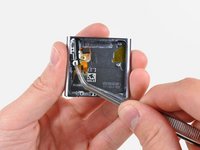
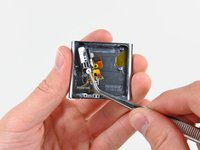
    6. iPod Nano 6th Generation Clip Replacement: 步骤 6 中的图像 1,2 iPod Nano 6th Generation Clip Replacement: 步骤 6 中的图像 2,2
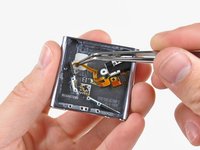
      • Use an opening tool to disconnect the display data and digitizer cable connectors up from their sockets on the logic board.

      询问修复机器人

      添加评论

    7. iPod Nano 6th Generation Clip Replacement: 步骤 7 中的图像 1,1
      • Remove the front panel assembly, minding its two cables that may get caught.

      • To reassemble, you can use the double-sided tape found here.

      添加评论

    1. iPod Nano 6th Generation Clip Replacement, Logic Board Assembly: 步骤 8 中的图像 1,1
      • Use an iPod opening tool to lift the headphone jack assembly connector up and out of its socket on the logic board.

      添加评论

    2. iPod Nano 6th Generation Clip Replacement: 步骤 9 中的图像 1,1
      • Remove the single 1.9 mm Phillips screw securing the logic board to the outer case.

      询问修复机器人

      添加评论

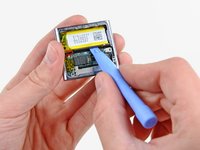
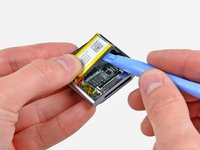
    3. iPod Nano 6th Generation Clip Replacement: 步骤 10 中的图像 1,2 iPod Nano 6th Generation Clip Replacement: 步骤 10 中的图像 2,2
      • Use an iPod opening tool to gently pry the battery up from the adhesive securing it to the outer case.

      • The adhesive is very strong. Work carefully and slowly, making sure to not slip and break any fragile components.

      • Use your thumb to pull the battery toward the left side of the Nano as you pry the battery's other edge out of the outer case.

      询问修复机器人

      添加评论

    4. iPod Nano 6th Generation Clip Replacement: 步骤 11 中的图像 1,1
      • Use an iPod opening tool to gently pry the logic board off the adhesive holding it against the outer case.

      • Do not excessively pry the logic board upward.

      添加评论

    5. iPod Nano 6th Generation Clip Replacement: 步骤 12 中的图像 1,2 iPod Nano 6th Generation Clip Replacement: 步骤 12 中的图像 2,2
      • Use your iPod opening tool to gently push the dock connector toward the center of the Nano.

      • Remove the logic board assembly from the Nano, being careful not to damage the headphone jack assembly cable.

      添加评论

    1. iPod Nano 6th Generation Clip Replacement, Headphone Jack Assembly: 步骤 13 中的图像 1,1
      • Remove the following five screws:

      • One 1.7 mm Phillips screw

      • Four 3.9 mm Phillips screws.

      询问修复机器人

      添加评论

    2. iPod Nano 6th Generation Clip Replacement: 步骤 14 中的图像 1,2 iPod Nano 6th Generation Clip Replacement: 步骤 14 中的图像 2,2
      在这个步骤中使用的工具:
      Tweezers
      $4.99
      • Use a pair of tweezers to carefully pull the headphone jack toward the center of the Nano.

      • Avoid pulling on the cable, as it is very thin and delicate. The plastic mounting ear is a safer area to pull on.

      添加评论

    3. iPod Nano 6th Generation Clip Replacement: 步骤 15 中的图像 1,2 iPod Nano 6th Generation Clip Replacement: 步骤 15 中的图像 2,2
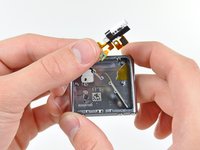
      • Very carefully pull the headphone jack assembly ribbon cable toward the dock connector to separate the sleep and volume buttons from the outer case.

      • Remove the headphone jack assembly.

      添加评论

    1. iPod Nano 6th Generation Clip Replacement, Clip: 步骤 16 中的图像 1,1
      • Remove the following three screws:

      • One black 1.8 mm Phillips screw

      • Two 1.7 mm Phillips screws

      询问修复机器人

      添加评论

    2. iPod Nano 6th Generation Clip Replacement: 步骤 17 中的图像 1,1
      • Remove the clip from the outer case.

      • When reinstalling the clip, it is necessary to squeeze the base of the clip very tightly against the outer case as you insert the first screw.

      询问修复机器人

      添加评论

结论

To reassemble your device, follow these instructions in reverse order.

取消:我没有完成这个指南。

27等其他人完成本指南。

0指南评论

添加评论

浏览统计数据:

过去 24 小时: 5

过去 7 天: 41

过去 30 天: 158

All Time: 90,894