简介
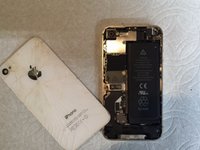
This guide consists of instructions on how to replace the battery in an iPhone 4S.
你所需要的
-
-
Push the back panel towards the top of the iPhone. Doing this should allow the back panel to slide off safely.
-
-
-
-
Remove these two screws that are securing the battery connector to the Logic Board.
-
-
-
Locate and pull the plastic tab to pull out the battery. Make sure to pry up on the outside of the battery on all sides.
-




结论
To reassemble your device, follow these instructions in reverse order.
62等其他人完成本指南。



