跳转到主内容
加入维修社区 - 创建账户
iPad Pro 11" LiDAR Sensor Assembly Replacement

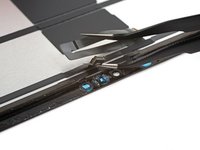
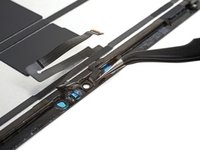
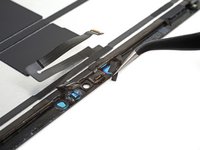
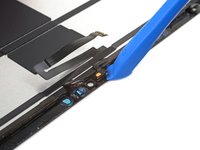
仅作为前提条件
本指南仅提供前提条件!本指南是另一个程序的一部分,不能单独使用。

你所需要的

  1. iPad Pro 11" LiDAR Sensor Assembly Replacement, LiDAR sensor assembly information: 步骤 1 中的图像 1,2 iPad Pro 11" LiDAR Sensor Assembly Replacement, LiDAR sensor assembly information: 步骤 1 中的图像 2,2
    • The LiDAR sensor assembly is paired to the Face ID hardware. You'll need to transfer it to your replacement screen to keep Face ID functionality. The following steps show how to remove the sensor assembly and install it on your replacement screen.

    • The LiDAR sensor assembly is composed of four total sensors:

    • Two ambient light sensors

    • One proximity sensor

    • One microphone

    • You'll need to separate each sensor from the screen before removing the entire assembly.

  2. iPad Pro 11" LiDAR Sensor Assembly Replacement, Heat the top sensor assembly: 步骤 2 中的图像 1,1
  3. iPad Pro 11" LiDAR Sensor Assembly Replacement, Separate the ambient light sensors: 步骤 3 中的图像 1,2 iPad Pro 11" LiDAR Sensor Assembly Replacement, Separate the ambient light sensors: 步骤 3 中的图像 2,2
    在这个步骤中使用的工具:
    Tweezers
    $3.99
    • Insert one arm of your angled tweezers between the ambient light sensor and the screen.

    • You can also use a precision knife, but be careful not to damage the ribbon cable.

    • Pry up to separate the sensor from the screen.

    • This might take significant force.

    • Repeat this procedure for the other ambient light sensor.

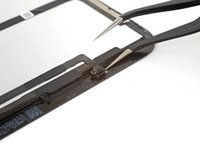
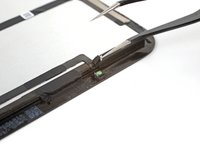
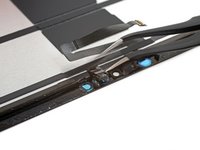
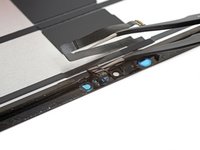
  4. iPad Pro 11" LiDAR Sensor Assembly Replacement, Separate the proximity sensor: 步骤 4 中的图像 1,3 iPad Pro 11" LiDAR Sensor Assembly Replacement, Separate the proximity sensor: 步骤 4 中的图像 2,3 iPad Pro 11" LiDAR Sensor Assembly Replacement, Separate the proximity sensor: 步骤 4 中的图像 3,3
    • Insert one arm of your angled tweezers between the proximity sensor cable and the screen.

    • Slide the tweezers toward the screen while prying to separate the sensor from the screen.

    • This might take significant force and multiple iOpener heating cycles.

  5. iPad Pro 11" LiDAR Sensor Assembly Replacement, Peel away the tape: 步骤 5 中的图像 1,2 iPad Pro 11" LiDAR Sensor Assembly Replacement, Peel away the tape: 步骤 5 中的图像 2,2
    • Peel off any tape covering the microphone.

    • Set the tape aside. You'll use it during reassembly.

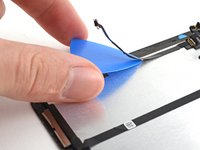
  6. iPad Pro 11" LiDAR Sensor Assembly Replacement, Separate the microphone: 步骤 6 中的图像 1,3 iPad Pro 11" LiDAR Sensor Assembly Replacement, Separate the microphone: 步骤 6 中的图像 2,3 iPad Pro 11" LiDAR Sensor Assembly Replacement, Separate the microphone: 步骤 6 中的图像 3,3
    • Slide an opening tool under the microphone to separate its adhesive.

    • Pry up to separate the microphone from the screen.

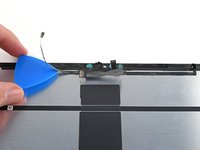
  7. iPad Pro 11" LiDAR Sensor Assembly Replacement, Remove the LiDAR sensor assembly: 步骤 7 中的图像 1,3 iPad Pro 11" LiDAR Sensor Assembly Replacement, Remove the LiDAR sensor assembly: 步骤 7 中的图像 2,3 iPad Pro 11" LiDAR Sensor Assembly Replacement, Remove the LiDAR sensor assembly: 步骤 7 中的图像 3,3
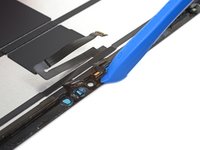
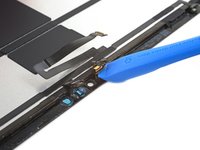
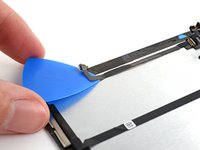
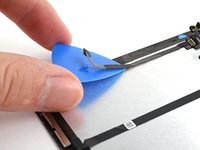
    • Slide an opening pick under the LiDAR sensor assembly cable to separate it from the screen.

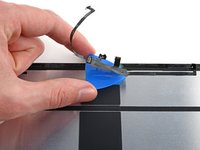
  8. iPad Pro 11" LiDAR Sensor Assembly Replacement: 步骤 8 中的图像 1,3 iPad Pro 11" LiDAR Sensor Assembly Replacement: 步骤 8 中的图像 2,3 iPad Pro 11" LiDAR Sensor Assembly Replacement: 步骤 8 中的图像 3,3
    • Continue sliding your opening pick under the LiDAR sensor assembly until it's completely separated from the screen.

    • Remove the LiDAR sensor assembly.

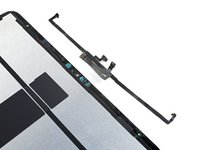
  9. iPad Pro 11" LiDAR Sensor Assembly Replacement: 步骤 9 中的图像 1,1
    在这个步骤中使用的工具:
    Tesa 61395 Tape
    $8.95
    • During reassembly, you'll have to perform the following:

    • Align the LiDAR sensor assembly on your replacement screen.

    • Use Tesa tape, or similar double-sided tape, to secure the cables to the screen.

    • Use E6000 adhesive, or similar adhesive, to secure the sensors to their cutouts on the screen.

    • Only apply adhesive to the edges of the sensors. Placing adhesive on the front will break them.

结论

To reassemble your device, follow these instructions in reverse order.

Chayton Ritter

于08/21/20注册

25,632 声望

创作了105篇指南

团队

Guide Team Guide Team 的会员

Staff

10 名成员

创作了16,171篇指南

0指南评论

添加评论

浏览统计数据:

过去 24 小时: 0

过去 7 天: 1

过去 30 天: 7

总计 92