跳转到主内容
加入维修社区 - 创建账户

iMac G5 17" Model A1144 Display Replacement

浏览量: 2.4万

浏览统计数据:

过去24小时
5
过去 7 天:
24
过去 30 天:
90
总计
23,969
评论: 10

10 comments on steps.

已完成: 21

21 人已将本指南标记为“已完成”。你会是下一个完成的人吗?

收藏: 4

4 人已收藏(并订阅)本指南。你会是下一个吗?

所需时间: 没有估计
难度: 中等
iMac G5 17" Model A1144 Display Replacement

Remove your display to access most major components on your iMac.

你所需要的

配件

工具

    1. iMac G5 17" Model A1144 Display Replacement, Access Door: 步骤 1 中的图像 1,1
      • Before you work on the computer, unplug the computer and press the power button for 20-30 seconds to drain the stored energy in the power supply.

      • Loosen the two Phillips screws securing the access door to your iMac.

      • These screws are captive in the access door.

      询问修复机器人
      添加评论

    2. iMac G5 17" Model A1144 Display Replacement: 步骤 2 中的图像 1,1
      • Remove the access door from your iMac.

      询问修复机器人

      添加评论

    1. iMac G5 17" Model A1144 Display Replacement, Front Bezel: 步骤 3 中的图像 1,1
      • Remove the three T8 Torx screws securing the front bezel to the rear panel.

      询问修复机器人

      添加评论

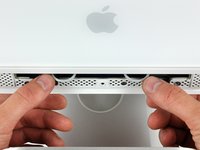
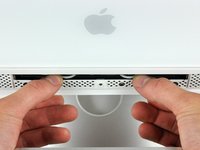
    2. iMac G5 17" Model A1144 Display Replacement: 步骤 4 中的图像 1,2 iMac G5 17" Model A1144 Display Replacement: 步骤 4 中的图像 2,2
      • Orient the iMac face-up, on its backside.

      • Use your thumbs to press both RAM arms in past the front bezel for enough clearance to lift it off the rear case.

      询问修复机器人

      添加评论

    3. iMac G5 17" Model A1144 Display Replacement: 步骤 5 中的图像 1,1
      • While holding the RAM arms in with your thumbs, lift the lower edge of the front bezel enough to clear the rear case.

      询问修复机器人

      添加评论

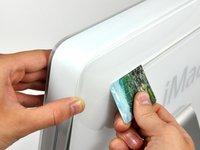
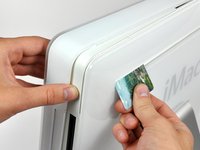
    4. iMac G5 17" Model A1144 Display Replacement: 步骤 6 中的图像 1,3 iMac G5 17" Model A1144 Display Replacement: 步骤 6 中的图像 2,3 iMac G5 17" Model A1144 Display Replacement: 步骤 6 中的图像 3,3
      在这个步骤中使用的工具:
      Plastic Cards
      $2.99
      • Re-orient your iMac so it sits upright on the stand.

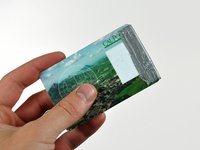
      • Insert a plastic card up into the corner of the air vent slot at the top of the rear case.

      • Push the card toward the top of the iMac to release the front bezel latch.

      • Pull the front bezel away from the rear case.

      • Repeat this process for the other side of the front bezel.

      • It may be necessary to apply several layers of duct tape to the top of the access card to aid in releasing the latches.

      • If the bezel refuses to release, try pressing the lower edge back onto the rear case and repeat this opening process.

      添加评论

    5. iMac G5 17" Model A1144 Display Replacement: 步骤 7 中的图像 1,1
      • Lay your iMac stand-side down on a table.

      • Lift the front bezel from its lower edge and rotate it away from the rest of your iMac, minding the RAM arms that may get caught.

      • Lay the front bezel above the rest of the iMac.

      询问修复机器人

      添加评论

    6. iMac G5 17" Model A1144 Display Replacement: 步骤 8 中的图像 1,1
      • If necessary, remove the piece of kapton tape wrapped around the microphone and camera cables.

      询问修复机器人

      添加评论

    7. iMac G5 17" Model A1144 Display Replacement: 步骤 9 中的图像 1,2 iMac G5 17" Model A1144 Display Replacement: 步骤 9 中的图像 2,2
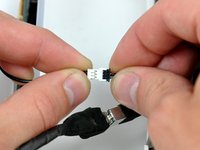
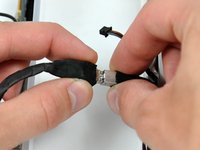
      • Disconnect both the camera and microphone cables.

      询问修复机器人

      添加评论

    1. iMac G5 17" Model A1144 Display Replacement, Display: 步骤 10 中的图像 1,1
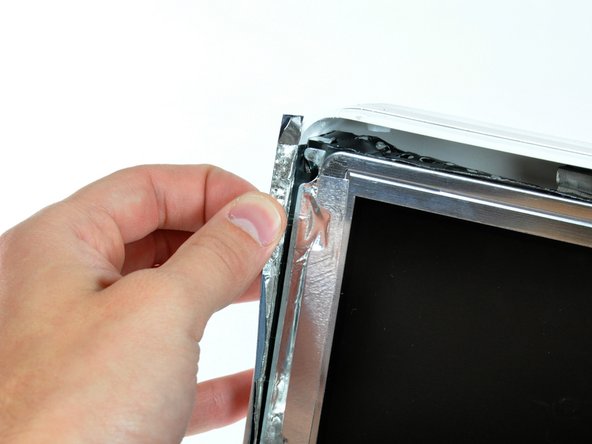
      • Peel back the aluminum EMI shield up off the lower three edges of the rear case.

      • It is not necessary to peel the EMI shield off the display.

      • We found it helpful to tape the EMI shield up against the display to keep it out of the way.

      询问修复机器人

      添加评论

    2. iMac G5 17" Model A1144 Display Replacement: 步骤 11 中的图像 1,2 iMac G5 17" Model A1144 Display Replacement: 步骤 11 中的图像 2,2
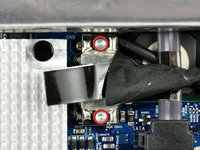
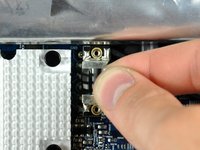
      • Remove the two 5 mm T6 Torx screws securing the display data cable to the logic board.

      • Using its attached black tab, pull the display data cable connector up off the logic board.

      询问修复机器人

      添加评论

    3. iMac G5 17" Model A1144 Display Replacement: 步骤 12 中的图像 1,1
      • Pull the inverter cable connector up off its socket on the logic board.

      询问修复机器人

      添加评论

    4. iMac G5 17" Model A1144 Display Replacement: 步骤 13 中的图像 1,1
      • Peel back the aluminum EMI tape from the two vertical edges of the display.

      • During reassembly, it is helpful to use several small strips of tape to hold the EMI shielding along the left and right edges of the display footprint out of the way before lowering the display into the rear case of your iMac.

      询问修复机器人

      添加评论

    5. iMac G5 17" Model A1144 Display Replacement: 步骤 14 中的图像 1,2 iMac G5 17" Model A1144 Display Replacement: 步骤 14 中的图像 2,2
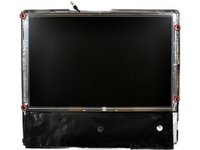
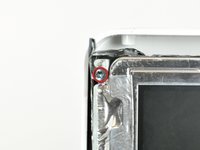
      • Remove the four recessed coarse-thread 7.5 mm T10 Torx screws securing the display to the rear case.

      • These screws are recessed, so a thin screwdriver such as this is essential for removal. Bit drivers tend to be too short for this application.

      添加评论

    6. iMac G5 17" Model A1144 Display Replacement: 步骤 15 中的图像 1,1
      • Lift the display from its lower edge and pull it toward yourself to peel it off the EMI shield attached to its top edge.

      • Be mindful of any cables that may get caught during removal.

      询问修复机器人

      添加评论

结论

To reassemble your device, follow these instructions in reverse order.

取消:我没有完成这个指南。

21等其他人完成本指南。

作者

与

Walter Galan

711,925 声望

创作了1,203篇指南

0指南评论

添加评论

浏览统计数据:

过去 24 小时: 5

过去 7 天: 24

过去 30 天: 90

总计 23,969