跳转到主内容

iMac 2019 Display Separation

仅作为前提条件
本指南仅提供前提条件!本指南是另一个程序的一部分,不能单独使用。

你所需要的

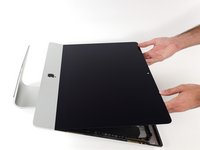
  1. iMac 2019 Display Separation, Separate the display: 步骤 1 中的图像 1,2 iMac 2019 Display Separation, Separate the display: 步骤 1 中的图像 2,2
    • Lift the display up to a near-vertical position.

    • At this point there is still a strip of adhesive along the bottom of the display that will hold the display to the frame like a hinge. You can loosen this adhesive by working the display up and down a few times.

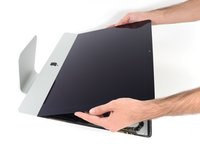
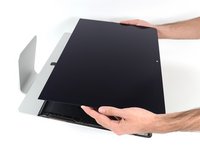
  2. iMac 2019 Display Separation: 步骤 2 中的图像 1,3 iMac 2019 Display Separation: 步骤 2 中的图像 2,3 iMac 2019 Display Separation: 步骤 2 中的图像 3,3
    在这个步骤中使用的工具:
    Plastic Cards
    $2.99
    • If necessary, a plastic card can be used to cut any remaining sections of the bottom adhesive strip.

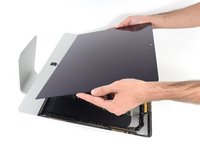
  3. iMac 2019 Display Separation: 步骤 3 中的图像 1,3 iMac 2019 Display Separation: 步骤 3 中的图像 2,3 iMac 2019 Display Separation: 步骤 3 中的图像 3,3
    • Lift the display up from the frame and remove it from the iMac.

    • It may be necessary to slowly lift from one side to peel against the remaining adhesive.

    • Be very careful handling the display—it's big, heavy, and made of glass.

    • After the adhesive is cut, it cannot be used to re-seal the display in place. Follow this guide to replace the adhesive strips that secure the display to the rear enclosure.

结论

To reassemble your device, follow these instructions in reverse order.

Adam O'Camb

于04/11/15注册

217,810 声望

创作了416篇指南

0指南评论

添加评论

浏览统计数据:

过去 24 小时: 0

过去 7 天: 3

过去 30 天: 7

总计 268