跳转到主内容
加入维修社区 - 创建账户

iBook G3 14" Rear Display Bezel Replacement

浏览量: 1782

浏览统计数据:

过去24小时
3
过去 7 天:
17
过去 30 天:
71
总计
1,782
评论: 0

暂时还没有人对本指南发表评论。你想做第一个评论的人吗?

Go to guide comments
已完成: 1

1 人已将本指南标记为“已完成”。你会是下一个完成的人吗?

收藏: 0

暂时还没有人收藏(和订阅)本指南。你会是第一个收藏(和订阅)的人吗?

所需时间: 没有估计
难度: 中等
iBook G3 14" Rear Display Bezel Replacement

Removing the rear display bezel does not require removal of the display assembly.

你所需要的

配件

工具

    1. iBook G3 14" Rear Display Bezel Replacement, Battery: 步骤 1 中的图像 1,1
      • Use a coin to rotate the battery locking screw 90 degrees clockwise.

      • Lift the battery out of the computer.

      询问修复机器人

      添加评论

    1. iBook G3 14" Rear Display Bezel Replacement, Rear Display Bezel: 步骤 2 中的图像 1,2 iBook G3 14" Rear Display Bezel Replacement, Rear Display Bezel: 步骤 2 中的图像 2,2
      • Use a 1.5 mm hex screwdriver to remove the two hex screws on either side of the display (four screws total).

      • If you don't have a 1.5 mm hex driver, you can probably get these screws out with a T6 Torx screwdriver. However, if you use a T6 Torx driver you'll be more likely to strip the screws.

      询问修复机器人

      添加评论

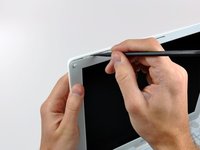
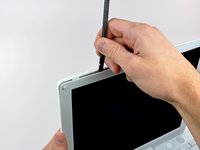
    2. iBook G3 14" Rear Display Bezel Replacement: 步骤 3 中的图像 1,2 iBook G3 14" Rear Display Bezel Replacement: 步骤 3 中的图像 2,2
      • Insert the flat end of a spudger perpendicular to the face of the display into the gap between the front and rear bezels near the upper left corner of the display.

      • Rotate the spudger away from the display to pry the rear bezel off the front bezel.

      询问修复机器人

      添加评论

    3. iBook G3 14" Rear Display Bezel Replacement: 步骤 4 中的图像 1,1
      • Run your spudger along the top edge of the front display bezel to evenly separate the two bezels.

      询问修复机器人

      添加评论

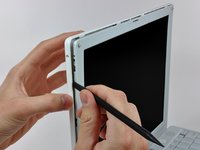
    4. iBook G3 14" Rear Display Bezel Replacement: 步骤 5 中的图像 1,2 iBook G3 14" Rear Display Bezel Replacement: 步骤 5 中的图像 2,2
      • Working down from the upper left corner, use the flat end of a spudger to pry the rear bezel away from the left edge of the display.

      询问修复机器人

      添加评论

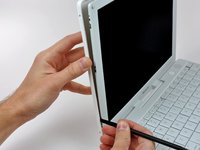
    5. iBook G3 14" Rear Display Bezel Replacement: 步骤 6 中的图像 1,1
      • Use the flat end of a spudger to pry the rear bezel away from the right edge of the display.

      • If necessary, pry along the bottom edge of the rear bezel to separate it from the display assembly.

      询问修复机器人

      添加评论

    6. iBook G3 14" Rear Display Bezel Replacement: 步骤 7 中的图像 1,1
      • Lift the rear bezel off the display assembly.

      询问修复机器人

      添加评论

结论

To reassemble your device, follow these instructions in reverse order.

取消:我没有完成这个指南。

另外一个人完成了本指南。

作者

与

0指南评论

添加评论

浏览统计数据:

过去 24 小时: 3

过去 7 天: 17

过去 30 天: 71

总计 1,782