跳转到主内容

Xiaomi Redmi Note Midframe Replacement

仅作为前提条件
本指南仅提供前提条件!本指南是另一个程序的一部分,不能单独使用。

你所需要的

  1. Xiaomi Redmi Note Midframe Replacement, Battery: 步骤 1 中的图像 1,1
    • Make sure the Xiaomi Redmi Note is powered off before removing the battery.

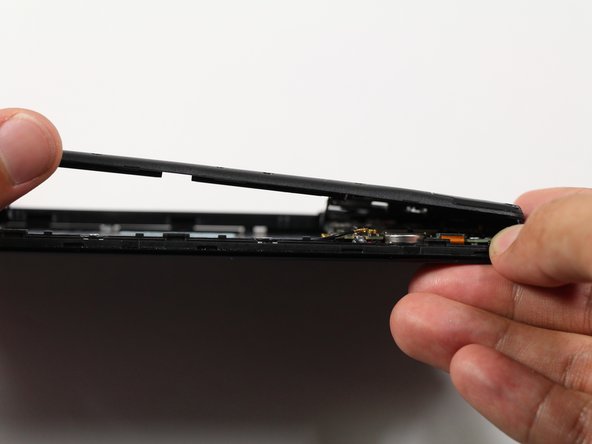
    • Insert the plastic opening tool between the charging port and the rear case.

    • Pry the end of the rear case up from the charging port.

  2. Xiaomi Redmi Note Midframe Replacement: 步骤 2 中的图像 1,2 Xiaomi Redmi Note Midframe Replacement: 步骤 2 中的图像 2,2
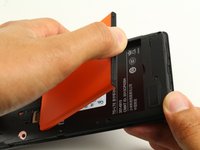
    • Run the plastic opening tool along the seam on the side of the phone to remove the rear casing.

  3. Xiaomi Redmi Note Midframe Replacement: 步骤 3 中的图像 1,2 Xiaomi Redmi Note Midframe Replacement: 步骤 3 中的图像 2,2
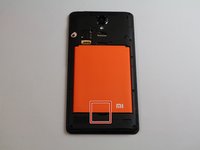
    • Locate the indentation at the bottom of the battery.

    • Place a finger in the indentation and lift up to remove the battery.

  4. Xiaomi Redmi Note Midframe Replacement, Midframe: 步骤 4 中的图像 1,2 Xiaomi Redmi Note Midframe Replacement, Midframe: 步骤 4 中的图像 2,2
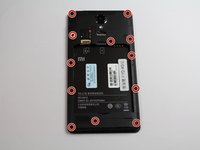
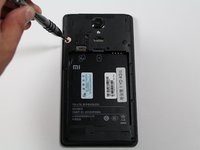
    • Remove twelve 3.5mm Phillips #00 screws from the midframe.

  5. Xiaomi Redmi Note Midframe Replacement: 步骤 5 中的图像 1,2 Xiaomi Redmi Note Midframe Replacement: 步骤 5 中的图像 2,2
    • Insert a plastic opening into the seam between the midframe and the bottom frame of the phone.

    • Run the plastic opening tool along the seam.

    • Pry up the midframe with the plastic opening tool.

    • Once the midframe has been sufficiently lifted with the tool, place a hand underneath the edge to lift the entire component out of the frame.

    • There will be snapping sounds as the clips on the midframe disconnect from the phone.

结论

To reassemble your device, follow these instructions in reverse order.

Zongyi Li

于04/26/17注册

1,623 声望

创作了3篇指南

团队

Cal Poly, Team S22-G4, Livingston Spring 2017 Cal Poly, Team S22-G4, Livingston Spring 2017 的会员

CPSU-LIVINGSTON-S17S22G4

4 名成员

创作了16篇指南

0指南评论

添加评论

浏览统计数据:

过去 24 小时: 0

过去 7 天: 2

过去 30 天: 8

总计 99