跳转到主内容
加入维修社区 - 创建账户

Xbox One Optical Drive Laser Replacement

你所需要的

  1. Xbox One Optical Drive Laser Replacement, Optical Drive Case Screws: 步骤 1 中的图像 1,1
    • Make sure the optical drive is not connected to any power source and is powered off.

    • Unscrew the four Phillips #1 screws on the top of the optical drive.

  2. Xbox One Optical Drive Laser Replacement, Optical Drive Case Lid: 步骤 2 中的图像 1,1
    • Lift the lid off of the optical drive case, this should require little to no force.

  3. Xbox One Optical Drive Laser Replacement, Optical Drive Case: 步骤 3 中的图像 1,2 Xbox One Optical Drive Laser Replacement, Optical Drive Case: 步骤 3 中的图像 2,2
    • Slide the remaining optical drive case off of the internal components.

    • Internal components often snag on these points when removing the optical drive case.

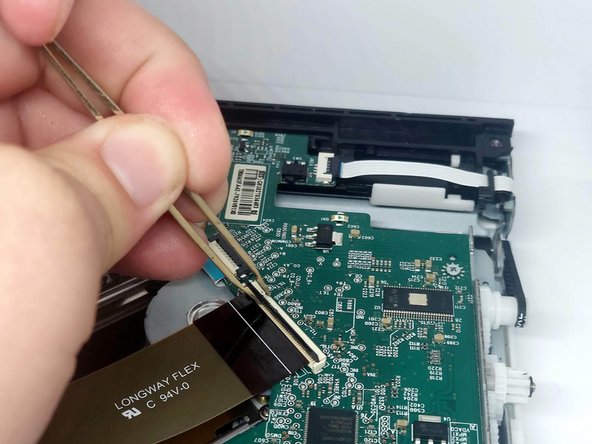
  4. Xbox One Optical Drive Laser Replacement, ZIF Connectors: 步骤 4 中的图像 1,2 Xbox One Optical Drive Laser Replacement, ZIF Connectors: 步骤 4 中的图像 2,2
    在这个步骤中使用的工具:
    Tweezers
    $4.99
    • Locate the three ZIF connectors on the optical drive PCB.

    • Using tweezers, gently lift the tab on each ZIF connector to release the ribbon cables.

    • Remove the ribbon cable from each ZIF connector.

  5. Xbox One Optical Drive Laser Replacement, PCB Screws: 步骤 5 中的图像 1,1
    • Unscrew the three Phillips #0 screws mounting the PCB.

  6. Xbox One Optical Drive Laser Replacement, Moving the PCB: 步骤 6 中的图像 1,1
    • Gently lift the PCB and place it to the side.

    • When lifting the PCB, be careful to not detach the wires connecting the PCB to the motor.

  7. Xbox One Optical Drive Laser Replacement, Optical Drive Laser Screws: 步骤 7 中的图像 1,1
    • Unscrew the three Phillips #0 screws mounting the optical drive laser.

  8. Xbox One Optical Drive Laser Replacement, Optical Drive Laser: 步骤 8 中的图像 1,1
    • Lift the old optical drive laser from the unit and place in the new optical drive laser.

结论

To reassemble your device, follow these instructions in reverse order.

9等其他人完成本指南。

Austin Stein

于02/24/21注册

369 声望

撰写一个指南

2指南评论

If my xbox one is reading Bluray disc(xbox one games/ Bluray movies), but for DVD it work sometimes, sometimes it wont (xbox 360 games/ DVD), should i replace the whole bluray drive or this Optical drive laser?

Ali Kazimi - 回复 分享

I would start with this repair. A faulty laser sounds like a very likely source for your issue. If it doesn't work you have a problem with the drive board.

Replacing the entire drive would require you to replace the main motherboard of the Xbox with one from the same console that the replacement drive came from because they are linked as an anti-piracy measure. At that point you're better off replacing the entire console.

Austin Stein - 分享

添加评论

浏览统计数据:

过去 24 小时: 11

过去 7 天: 54

过去 30 天: 221

总计 9,127