跳转到主内容

Xbox 360 S硬盘更换

你所需要的

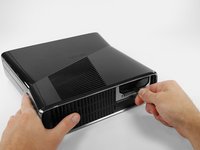
  1. Xbox 360 S硬盘更换, 硬盘: 步骤 1 中的图像 1,3 Xbox 360 S硬盘更换, 硬盘: 步骤 1 中的图像 2,3 Xbox 360 S硬盘更换, 硬盘: 步骤 1 中的图像 3,3
    • 将 Xbox 360 S 的底部朝向您放置。

    • 将固定硬盘驱动器盖的锁扣向左推。

    • 将硬盘驱动器盖从控制台处拉开。

  2. Xbox 360 S硬盘更换: 步骤 2 中的图像 1,3 Xbox 360 S硬盘更换: 步骤 2 中的图像 2,3 Xbox 360 S硬盘更换: 步骤 2 中的图像 3,3
    • 牢牢抓住硬盘上附带的标有硬盘大小的织物标签(例如“250 GB”)。

    • 将硬盘直接从控制台中拔出。

    • 织物标签连接在硬盘外壳内部更深处的一个卡扣上。需要用力才能将硬盘拉出。

结论

要重新组装您的设备,请按相反顺序执行这些步骤。

106等其他人完成本指南。

由衷感谢以下译者:

en zh

100%

TENta10正在帮助我们修复这个世界! 您也想加入吗?
开始翻译 ›

Brett Hartt

于04/12/10注册

131,185 声望

创作了143篇指南

团队

iFixit iFixit 的会员

Staff

123 名成员

创作了23,605篇指南

5指南评论

do you have to transfer the OS? or data? if so what utility is used? do you need a data transfer cable?

Can I just add an external drive to supplement the existing HDD?

David Johnson - 回复

no the os is on the internal drive all the hard drive is doing is adding more storge space

Nightwolf Gamer -

My hardrive says its unformated but its not and i dont want to loose content

Javier Eduardo Pacheco Hazim - 回复

Can I take the external out of the little black cover?

Lallie Cooney - 回复

Will it play backwards compatible games

justin rzonca - 回复

添加评论

浏览统计数据:

过去 24 小时: 17

过去 7 天: 133

过去 30 天: 577

总计 158,529