跳转到主内容

Why! NV41MZ SSD Replacement

你所需要的

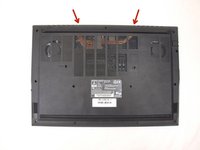
  1. Why! NV41MZ SSD Replacement, Bottom Cover: 步骤 1 中的图像 1,3 Why! NV41MZ SSD Replacement, Bottom Cover: 步骤 1 中的图像 2,3 Why! NV41MZ SSD Replacement, Bottom Cover: 步骤 1 中的图像 3,3
    • Remove the 14 screws securing the bottom case to the laptop.

    • Unclip the case by sliding a plastic spudger into the slots in the case.

    • Remove the bottom case.

  2. Why! NV41MZ SSD Replacement, Remove the SSD: 步骤 2 中的图像 1,2 Why! NV41MZ SSD Replacement, Remove the SSD: 步骤 2 中的图像 2,2
    • Remove the Phillips screw securing the SSD.

    • The SSD board will pop up slightly once the screw is removed. Lift it to relieve any tension and pull it straight out.

结论

To reassemble your device, follow the instructions in reverse order.

由衷感谢以下译者:

fr en

100%

Jerry Wheeler正在帮助我们修复这个世界! 您也想加入吗?
开始翻译 ›

Felice Suglia

于06/15/13注册

33,538 声望

创作了283篇指南

0指南评论

添加评论

浏览统计数据:

过去 24 小时: 0

过去 7 天: 2

过去 30 天: 7

总计 420