跳转到主内容
加入维修社区 - 创建账户

此翻译可能不反映源指南的最新更新。 帮助更新翻译查看源指南

Wacom Intuos Pro 电池更换

你所需要的

  1. Wacom Intuos Pro 电池更换, 电池: 步骤 1 中的图像 1,3 Wacom Intuos Pro 电池更换, 电池: 步骤 1 中的图像 2,3 Wacom Intuos Pro 电池更换, 电池: 步骤 1 中的图像 3,3
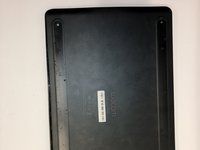
    • 调整设备方向,使其底部外壳朝上。

    • 用手指轻轻向上拉动设备底部橡胶盖,将其取下。

  2. Wacom Intuos Pro 电池更换: 步骤 2 中的图像 1,3 Wacom Intuos Pro 电池更换: 步骤 2 中的图像 2,3 Wacom Intuos Pro 电池更换: 步骤 2 中的图像 3,3
    • 请用菲利普#00十字螺丝刀卸下橡胶脚底部的四颗4毫米螺钉。

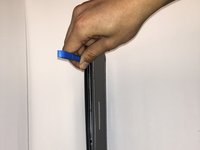
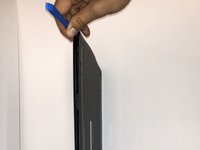
  3. Wacom Intuos Pro 电池更换: 步骤 3 中的图像 1,2 Wacom Intuos Pro 电池更换: 步骤 3 中的图像 2,2
    • 使用 iFixit 开启工具在设备的前后盖之间插入,以便松开并分离边缘周围的卡扣。

    • 使用 iFixit 开启工具,沿着边缘撬开,直到所有卡扣都松开为止。

    • 请您保持握紧设备以防止其滑动,沿着边缘撬开。

  4. Wacom Intuos Pro 电池更换: 步骤 4 中的图像 1,2 Wacom Intuos Pro 电池更换: 步骤 4 中的图像 2,2
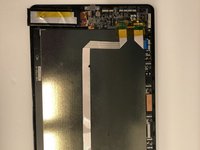
    • 将设备后盖轻轻从背面移除,以便露出内部组件。

  5. Wacom Intuos Pro 电池更换: 步骤 5 中的图像 1,2 Wacom Intuos Pro 电池更换: 步骤 5 中的图像 2,2
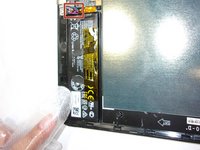
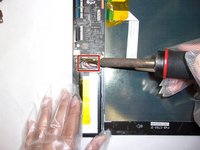
    • 在步骤完成之前,请将连接电池和主板的三根彩色线缆进行拆除。

    • 拆除电池后,小心地将其取下。

    • 请小心操作烙铁,因为它的工作温度极高,这可能会损坏其他元件。

    • 需要帮助焊接,请查看我们的“如何焊接和拆除连接”指南。

结论

按照上述指南的倒序即可重新组装设备。

3等其他人完成本指南。

由衷感谢以下译者:

en zh

88%

Globefish正在帮助我们修复这个世界! 您也想加入吗?
开始翻译 ›

6指南评论

thank you so much. I plan to buy this wacom, however I had the doubt if better the old version that has extractable battery, but with this post, I can go for the new one

Sebastian Ramirez - 回复 分享

Do you know where can I find the battery replacement?

Valerio _ - 回复 分享

Has anyone got a lint to the replacement battery?

Luca Di Meo - 回复 分享

PTH-660 works fine without the battery, just remove it and use it with USB cable

Luca Di Meo - 回复 分享

Where can I find a replacement battery for this model?

Denise Hanly - 回复 分享

添加评论

浏览统计数据:

过去 24 小时: 4

过去 7 天: 37

过去 30 天: 212

总计 10,685