跳转到主内容
加入维修社区 - 创建账户

Trio Stealth Pro 9.7" Speaker Replacement

浏览量: 477

浏览统计数据:

过去24小时
2
过去 7 天:
11
过去 30 天:
82
总计
477
评论: 0

暂时还没有人对本指南发表评论。你想做第一个评论的人吗?

Go to guide comments
已完成: 1

1 人已将本指南标记为“已完成”。你会是下一个完成的人吗?

收藏: 0

暂时还没有人收藏(和订阅)本指南。你会是第一个收藏(和订阅)的人吗?

所需时间: 没有估计
难度: 中等
要点符号!

更好地协调标记与要点符号的颜色和类型将有助于使本指南更清楚!

更好的介绍

通过完成或修改其开头介绍以改善本指南。

缺少细节

本指南有些细节缺失。请通过添加所需工具、难度或所需时间来帮助用户。

Trio Stealth Pro 9.7" Speaker Replacement

你所需要的

工具

    1. Trio Stealth Pro 9.7" Speaker Replacement, Speaker: 步骤 1 中的图像 1,1
      • Remove 2 black 4 cm screws on either side of the bottom of the device.

      询问修复机器人

      添加评论

    2. Trio Stealth Pro 9.7" Speaker Replacement: 步骤 2 中的图像 1,2 Trio Stealth Pro 9.7" Speaker Replacement: 步骤 2 中的图像 2,2
      • Use the plastic opening tools and the spudger around the outside of silver metal back plate on the device to pry off the back plate.

      询问修复机器人

      添加评论

    3. Trio Stealth Pro 9.7" Speaker Replacement: 步骤 3 中的图像 1,2 Trio Stealth Pro 9.7" Speaker Replacement: 步骤 3 中的图像 2,2
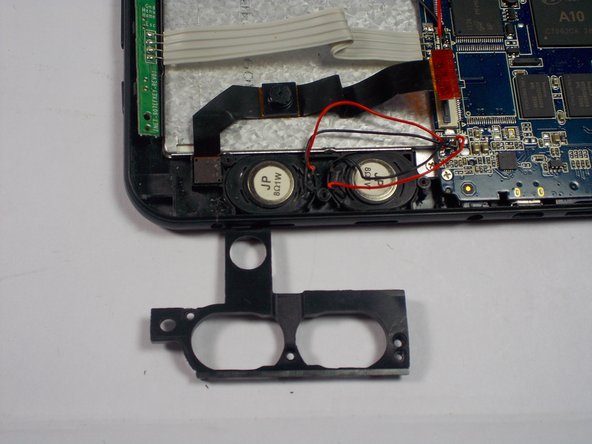
      • Remove 3 silver 4 cm Phillips screws holding down plastic speaker cover.

      • Remove plastic cover.

      询问修复机器人

      添加评论

    4. Trio Stealth Pro 9.7" Speaker Replacement: 步骤 4 中的图像 1,2 Trio Stealth Pro 9.7" Speaker Replacement: 步骤 4 中的图像 2,2
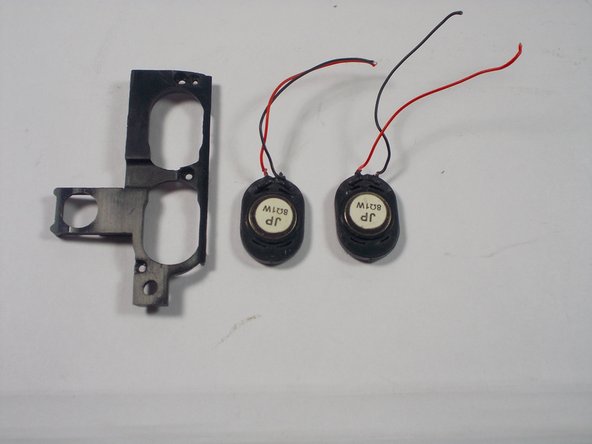
      • Cut 2 red and 2 black wires connecting speakers to the motherboard.

      • Remove speakers.

      询问修复机器人

      添加评论

结论

To reassemble your device, follow these instructions in reverse order.

取消:我没有完成这个指南。

另外一个人完成了本指南。

团队

UMass Dartmouth, Team 1-3, Miles Spring 2015 UMass Dartmouth, Team 1-3, Miles Spring 2015 的会员

UMASSD-MILES-S15S1G3

3 名成员

创作了60篇指南

0指南评论

添加评论

浏览统计数据:

过去 24 小时: 2

过去 7 天: 11

过去 30 天: 82

总计 477
