你所需要的
-
-
The front of the watch. Of course the battery is in the back.
-
The button on the left is used to rotate the watch within the clip. The button does not release the watch from the clip.
-
-
-
You will find a rubber cover held down by 6 small metal tabs.
-
Note - the tab circled in orange was bent in a way that the tab could not be unbent. I don't know if that is on purpose.
-
-
-
-
The tabs are now bent upward in order to release the rubber gasket. Note that the tab circled in orange was not unbent.
-
-
-
The upper screw is longer than the lower screw. The upper screw tab has an extra tab.
-
-
-
Two screws hold down the battery cover. The screw in the side with a tab is slightly longer than the other side.
-
-
-
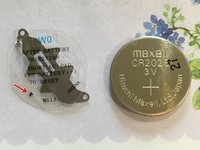
Peel the battery holder off of the CR2025 battery.
-
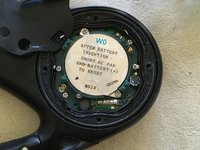
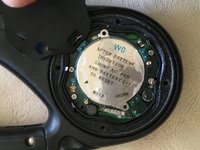
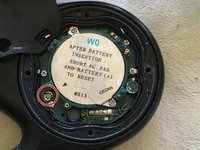
Note the message on the cover: After battery insertion short AC pad and battery (+) to reset. Note the small arrow on the lower left.
-
The top of the battery is (+).
-




To reassemble your device, follow these instructions in reverse order.
另外一个人完成了本指南。



1指南评论
Thank you Duane! I had taken the back off but didn’t realize the battery was under a sticker. It was there the whole time after all. I’ve had this watch for years and never got this done until now so it’s nice to see it running again. Great directions on your part. I used to do all the battery replacements and band installs/ link removal at our department store as a young woman but it’s been awhile and I’m a bit rusty at this now.
