跳转到主内容
加入维修社区 - 创建账户

Sony Vaio VGN-FS640 RAM Cover Replacement

你所需要的

  1. Sony Vaio VGN-FS640 RAM Cover Replacement, Battery: 步骤 1 中的图像 1,1
    • Lay the closed laptop on its screen so the bottom is facing towards you.

    询问修复机器人

    添加评论

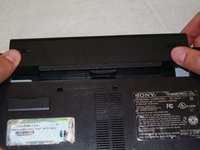
  2. Sony Vaio VGN-FS640 RAM Cover Replacement: 步骤 2 中的图像 1,1
    • Push both latches towards the center of the battery.

    询问修复机器人

    添加评论

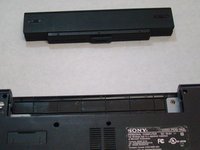
  3. Sony Vaio VGN-FS640 RAM Cover Replacement: 步骤 3 中的图像 1,2 Sony Vaio VGN-FS640 RAM Cover Replacement: 步骤 3 中的图像 2,2
    • Revome the battery by pushing it away from the laptop.

    • Set the battery away from the laptop.

    询问修复机器人

    添加评论

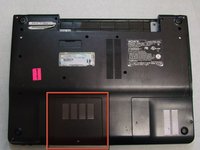
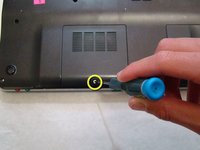
  4. Sony Vaio VGN-FS640 RAM Cover Replacement, RAM Cover: 步骤 4 中的图像 1,2 Sony Vaio VGN-FS640 RAM Cover Replacement, RAM Cover: 步骤 4 中的图像 2,2
    • With the bottom of the laptop facing up, locate the RAM cover.

    • The RAM is covered by the panel with four columns of vents.

    • Locate the screw (Length: 4.8 mm) holding down the panel, which is near the edge of the laptop. Unscrew it with your phillips #0 screwdriver.

    询问修复机器人

    添加评论

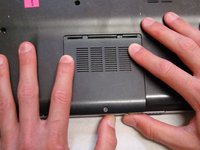
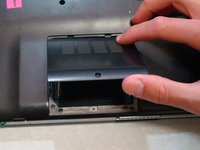
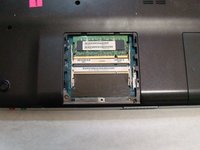
  5. Sony Vaio VGN-FS640 RAM Cover Replacement: 步骤 5 中的图像 1,3 Sony Vaio VGN-FS640 RAM Cover Replacement: 步骤 5 中的图像 2,3 Sony Vaio VGN-FS640 RAM Cover Replacement: 步骤 5 中的图像 3,3
    • Use your fingers to slide the cover away from the laptop. (It will only slide a few millimeters)

    • Once the panel is out of its locked position, it can be lifted out without any resistance.

    询问修复机器人

    添加评论

结论

To reassemble your device, follow these instructions in reverse order.

取消:我没有完成这个指南。

团队

Cal Poly, Team 24-32, Regan Spring 2010 Cal Poly, Team 24-32, Regan Spring 2010 的会员

CPSU-REGAN-S10S24G32

4 名成员

创作了16篇指南

0指南评论

添加评论

浏览统计数据:

过去 24 小时: 0

过去 7 天: 2

过去 30 天: 28

总计 5,254