跳转到主内容
加入维修社区 - 创建账户

Sony SLT Alpha-65V Back Panel Disassembly

仅作为前提条件
本指南仅提供前提条件!本指南是另一个程序的一部分,不能单独使用。

你所需要的

  1. Sony SLT Alpha-65V  Back Panel Disassembly, LCD Screen: 步骤 1 中的图像 1,2 Sony SLT Alpha-65V  Back Panel Disassembly, LCD Screen: 步骤 1 中的图像 2,2
    • Remove the two 4.0 mm Phillips #00 screws on the base of the camera.

    • Remove the 3.0 mm Phillips #00 screw on the hinge of the screen.

  2. Sony SLT Alpha-65V  Back Panel Disassembly: 步骤 2 中的图像 1,2 Sony SLT Alpha-65V  Back Panel Disassembly: 步骤 2 中的图像 2,2
    • Remove the two 2.0 mm Phillips #00 screws on the bottom-right side of the screen.

    • Remove the two 2.0 mm Phillips #00 screws on the bottom-left side of the screen.

  3. Sony SLT Alpha-65V  Back Panel Disassembly: 步骤 3 中的图像 1,1
    • Use the plastic opening tool to gently pry the screen open around the entire screen.

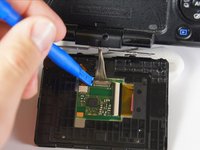
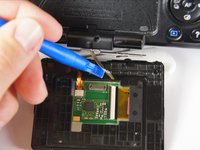
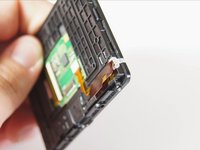
  4. Sony SLT Alpha-65V  Back Panel Disassembly: 步骤 4 中的图像 1,3 Sony SLT Alpha-65V  Back Panel Disassembly: 步骤 4 中的图像 2,3 Sony SLT Alpha-65V  Back Panel Disassembly: 步骤 4 中的图像 3,3
    • The brown ribbon and white light on the edge of the screen are extremely loose and will fall off off. Keep the screen flat at all times to make sure they don't come out.

    • Use a plastic opening tool to disconnect the silver wires from the screen's circuitry and completely remove the screen from the camera.

  5. Sony SLT Alpha-65V  Back Panel Disassembly, Back Panel: 步骤 5 中的图像 1,1
    • Unscrew the four 4.0 mm Phillips #00 screws with a on the base of the camera below the the scheme that separates the front and back panels.

    • Unscrew the 5.0 mm Phillips #00 screw on the bottom right of the camera.

  6. Sony SLT Alpha-65V  Back Panel Disassembly: 步骤 6 中的图像 1,1
    • Unscrew the 4.0 mm Phillips #00 screw on bottom of the left side of the camera.

    • Unscrew the 5.0 mm Phillips #00 screw near the top of the left side of the camera.

  7. Sony SLT Alpha-65V  Back Panel Disassembly: 步骤 7 中的图像 1,1
    • Be careful when pulling the back panel away as it will still be connected to the body of the camera by two strips of film.

    • When unscrewing the 5.0 mm screw on the dial, make sure to hold onto the dial that becomes detached after taking out the screw.

    • Unscrew the two 4.0 mm Phillips #00 screw at the top of the camera by the eyepiece.

    • Unscrew the 5.0 mm Phillips #00 screw of the dial below the other two screws.

    • Once all the screws are removed, carefully use your hands to detach the back panel from the camera. Working around the edges can help as well.

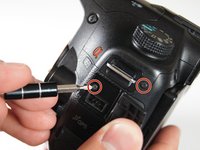
  8. Sony SLT Alpha-65V  Back Panel Disassembly: 步骤 8 中的图像 1,3 Sony SLT Alpha-65V  Back Panel Disassembly: 步骤 8 中的图像 2,3 Sony SLT Alpha-65V  Back Panel Disassembly: 步骤 8 中的图像 3,3
    • Remove the two 4.0 mm Phillips #00 screws on the right of the camera that are located on the upper right side and under the "Remote" port flap.

    • Detach the right side panel with the remote and HDMI ports of the camera by gently pulling on the panel.

  9. Sony SLT Alpha-65V  Back Panel Disassembly: 步骤 9 中的图像 1,1
    在这个步骤中使用的工具:
    Tweezers
    $4.99
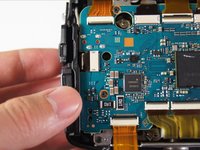
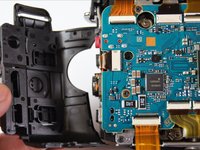
    • When the back panel is removed, be careful when moving the camera. There are parts inside the camera which now may come loose.

    • Use tweezers to remove the blue and orange ribbon connectors from their connection points pictured here.

结论

To reassemble your device, follow these instructions in reverse order.

Dima Kyle

于04/21/15注册

513 声望

创作了2篇指南

团队

Cal Poly, Team 14-11, Amido Spring 2015 Cal Poly, Team 14-11, Amido Spring 2015 的会员

CPSU-AMIDO-S15S14G11

4 名成员

创作了13篇指南

0指南评论

添加评论

浏览统计数据:

过去 24 小时: 0

过去 7 天: 1

过去 30 天: 4

总计 173