简介
This guide provides a step-by-step approach to safely removing the back cover of the Sony MVC-FD200. It ensures that users can access the internal parts of the camera for troubleshooting or replacement without harming the device. Whether you are replacing a faulty screen, cleaning the internal parts, or making other adjustments, this guide will help you navigate the process effectively.
你所需要的
-
-
Using your finger, slide the tab on the battery door up to release the battery latch.
-
-
-
-
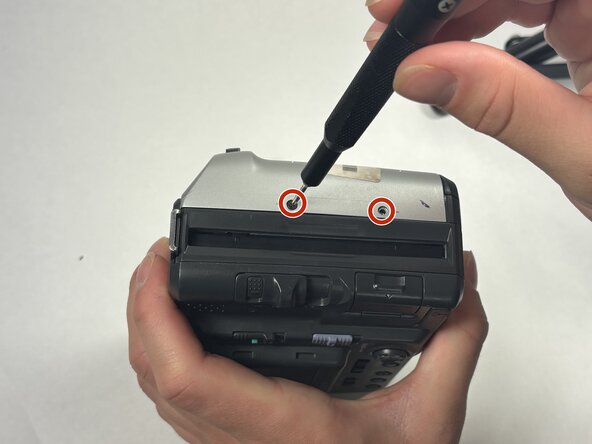
Turn the camera so that the top is facing down towards the table.
-
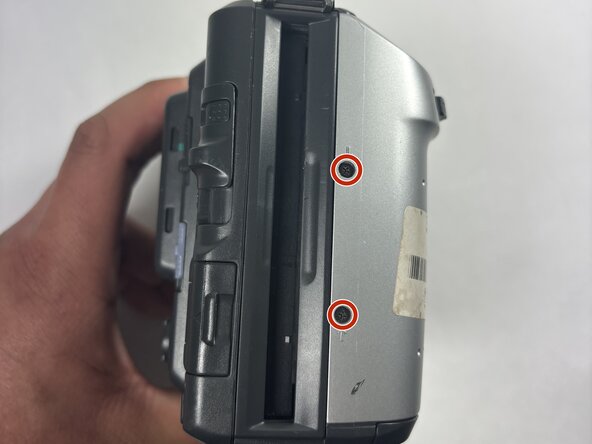
Using the Phillips #00 screwdriver, remove all 2.0 mm screws with the arrows facing towards them.
-


To reassemble your device, follow these instructions in reverse order.


团队

UMass Dartmouth, Team 1-4, Rioux Spring 2025 UMass Dartmouth, Team 1-4, Rioux Spring 2025 的会员
UMASSD-RIOUX-S25S1G4
4 名成员
创作了4篇指南
