跳转到主内容
加入维修社区 - 创建账户

Samsung Galaxy Tab 7.0 Rear Camera Replacement

浏览量: 5702

View statistics:

Past 24 Hours:
3
Past 7 Days:
26
Past 30 Days:
95
All Time:
5,702
评论: 3

3 comments on steps.

已完成: 2

2 people have marked this guide "completed." Will you be next?

收藏: 11

11 people have favorited (and subscribed to) this guide. Will you be next?

所需时间: 没有估计
难度: 中等
Samsung Galaxy Tab 7.0 Rear Camera Replacement

Use this guide to replace the rear camera.

你所需要的

配件

工具

    1. Samsung Galaxy Tab 7.0 Rear Camera Replacement, Front Panel: 步骤 1 中的图像 1,1
      • Use the flat end of a metal spudger to pry the two plastic tabs near the dock connector off the rear case.

      询问修复机器人

      添加评论

    2. Samsung Galaxy Tab 7.0 Rear Camera Replacement: 步骤 2 中的图像 1,1
      • Remove the two 4.1 mm Tri-Wing screws near the adjacent edges of the dock connector.

      询问修复机器人

      添加评论

    3. Samsung Galaxy Tab 7.0 Rear Camera Replacement: 步骤 3 中的图像 1,1
      • The following steps will require you to disengage several clips (highlighted in red) around the perimeter of the rear case. The clips are delicate and fragile; proceed with caution.

      询问修复机器人

      添加评论

    4. Samsung Galaxy Tab 7.0 Rear Camera Replacement: 步骤 4 中的图像 1,2 Samsung Galaxy Tab 7.0 Rear Camera Replacement: 步骤 4 中的图像 2,2
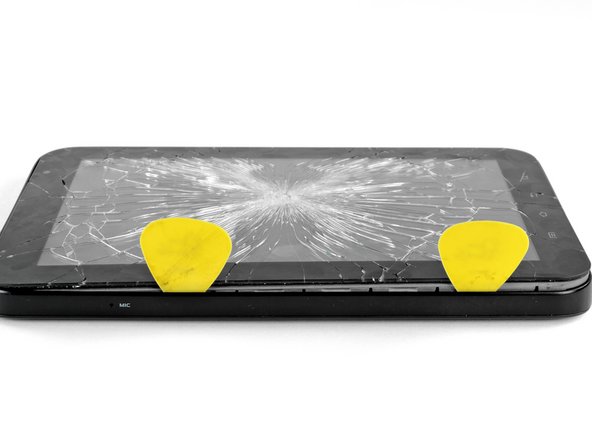
      • Disclaimer: The Galaxy Tab we acquired already had a shattered front glass panel. However, the procedure outlined in this guide is identical for both intact/shattered front panels.

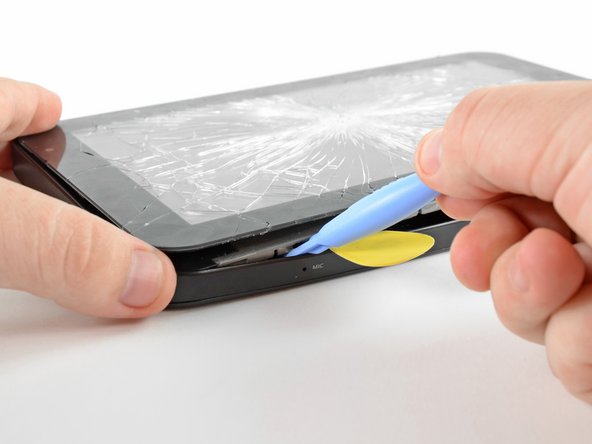
      • Insert a plastic opening tool near the bottom left edge of the rear case.

      • Use your plastic opening tool to gently create a small gap between the front panel and the rear panel near the bottom left edge.

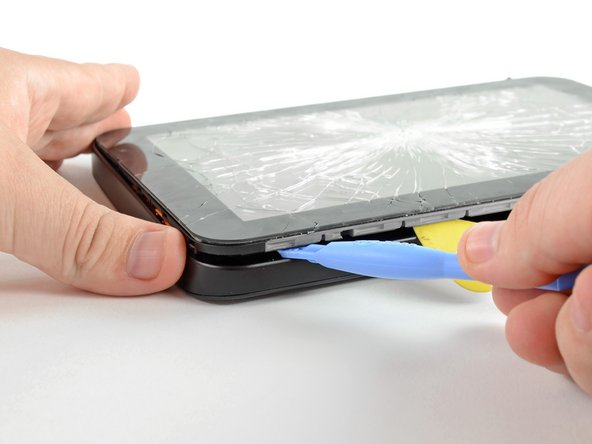
      • Run the plastic opening tool along the left side of the perimeter to create a bigger gap between the front panel and the rear panel.

      • Insert two guitar picks into the small gap created by the plastic opening tool.

      询问修复机器人

      添加评论

    5. Samsung Galaxy Tab 7.0 Rear Camera Replacement: 步骤 5 中的图像 1,2 Samsung Galaxy Tab 7.0 Rear Camera Replacement: 步骤 5 中的图像 2,2
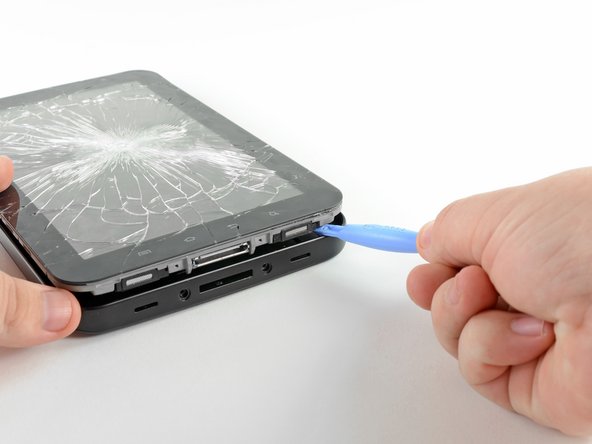
      • Insert the plastic opening tool into the dock connector and wedge it underneath the front panel/motherboard assembly.

      • Thrust the plastic opening tool downwards to create a gap near the lower left corner of the front panel assembly.

      • Insert a guitar pick into the newly created gap near the lower left edge of the Galaxy Tab.

      询问修复机器人

      添加评论

    6. Samsung Galaxy Tab 7.0 Rear Camera Replacement: 步骤 6 中的图像 1,3 Samsung Galaxy Tab 7.0 Rear Camera Replacement: 步骤 6 中的图像 2,3 Samsung Galaxy Tab 7.0 Rear Camera Replacement: 步骤 6 中的图像 3,3
      • Be careful when approaching the top left corner of the Galaxy Tab. Be sure to follow the next step carefully.

      • When separating the front panel from the top left corner of the Galaxy Tab, be careful not to rip the microphone ribbon cable (highlighted in red in the first picture). It is extremely thin and easy to tear.

      • Insert a plastic opening tool into the gap next to the left side of the guitar pick.

      • Make sure to wedge it underneath the inner framework to gain the most leverage when releasing the clips.

      • Simultaneously lift upwards and run the plastic opening tool along the top left corner of the Galaxy Tab to free the Front Panel Assembly from the retaining clips.

      询问修复机器人

      添加评论

    7. Samsung Galaxy Tab 7.0 Rear Camera Replacement: 步骤 7 中的图像 1,1
      • Slightly lift the left side of the front panel assembly to separate it from its housing within the rear panel.

      • Do not completely lift the front panel assembly, as it is still restrained to the rear panel by clips around the top, bottom, and right sides. Doing so may cause severe damage.

      询问修复机器人

      添加评论

    8. Samsung Galaxy Tab 7.0 Rear Camera Replacement: 步骤 8 中的图像 1,2 Samsung Galaxy Tab 7.0 Rear Camera Replacement: 步骤 8 中的图像 2,2
      • Wedge the flat edge of an opening tool between the front panel and rear panel near the dock connector.

      • Use a plastic opening tool to pry the bottom right corner out of its housing in the rear panel.

      询问修复机器人

      添加评论

    9. Samsung Galaxy Tab 7.0 Rear Camera Replacement: 步骤 9 中的图像 1,1
      • Lift and remove the front panel assembly from the rear panel.

      添加评论

    1. Samsung Galaxy Tab 7.0 Rear Camera Replacement, Battery: 步骤 10 中的图像 1,1
      • Remove the single Phillips screw securing the battery to the motherboard.

      询问修复机器人

      添加评论

    2. Samsung Galaxy Tab 7.0 Rear Camera Replacement: 步骤 11 中的图像 1,1
      • Use the edge of a plastic opening tool to pry the battery connector straight up off its socket on the motherboard.

      询问修复机器人

      添加评论

    1. Samsung Galaxy Tab 7.0 Rear Camera Replacement, Rear Camera: 步骤 12 中的图像 1,1
      • Use the edge of a plastic opening tool to pry the rear camera connector up from its socket on the motherboard.

      询问修复机器人

      添加评论

    2. Samsung Galaxy Tab 7.0 Rear Camera Replacement: 步骤 13 中的图像 1,1
      • Lift and remove the rear camera from the Galaxy Tab.

      询问修复机器人

      添加评论

结论

To reassemble your device, follow these instructions in reverse order.

取消:我没有完成这个指南。

2等其他人完成本指南。

0指南评论

添加评论

浏览统计数据:

过去 24 小时: 3

过去 7 天: 26

过去 30 天: 95

All Time: 5,702