跳转到主内容
加入维修社区 - 创建账户

Samsung Galaxy Stardust Battery Replacement

浏览量: 4883

浏览统计数据:

过去24小时
5
过去 7 天:
25
过去 30 天:
123
总计
4,883
评论: 2

2 guide comments.

Go to guide comments
已完成: 0

暂时还没有人将本指南标记为“已完成”。你会是第一个完成的人吗?

收藏: 0

暂时还没有人收藏(和订阅)本指南。你会是第一个收藏(和订阅)的人吗?

所需时间: 1分钟
难度: 简单
Samsung Galaxy Stardust Battery Replacement

This will show you how to replace the battery in a Samsung Galaxy Stardust (SM-S766C(GP)), a smartphone distributed by TracFone. This guide exists to help people who use this cheaper smartphone as an option and need to replace the battery instead of buying a new phone. While replacing this battery, be careful not to pierce or puncture the battery as the contents are dangerous to people. Please dispose of the battery in a safe manner.

你所需要的

工具

    1. Samsung Galaxy Stardust Battery Replacement, Battery: 步骤 1 中的图像 1,2 Samsung Galaxy Stardust Battery Replacement, Battery: 步骤 1 中的图像 2,2
      • Hold down the power button located on the right side of the phone.

      • After five seconds, the screen will display three different options. Select the "power off" option.

      询问修复机器人

      添加评论

    2. Samsung Galaxy Stardust Battery Replacement: 步骤 2 中的图像 1,3 Samsung Galaxy Stardust Battery Replacement: 步骤 2 中的图像 2,3 Samsung Galaxy Stardust Battery Replacement: 步骤 2 中的图像 3,3
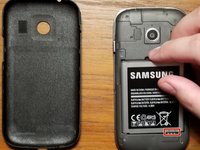
      • Place your finger or opening tool in the hole on the side of the phone.

      • Carefully pull the back casing away from the phone while keeping the phone stable.

      询问修复机器人

      添加评论

    3. Samsung Galaxy Stardust Battery Replacement: 步骤 3 中的图像 1,2 Samsung Galaxy Stardust Battery Replacement: 步骤 3 中的图像 2,2
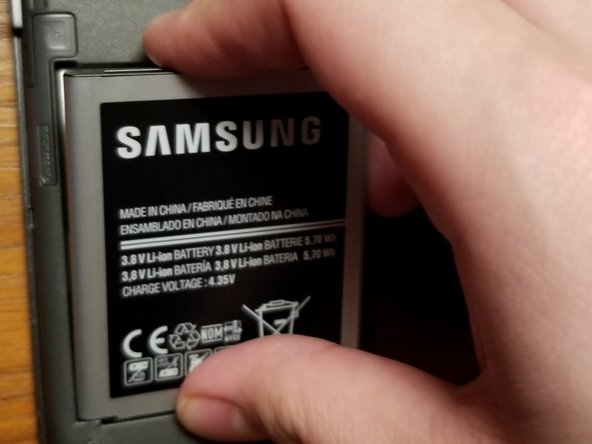
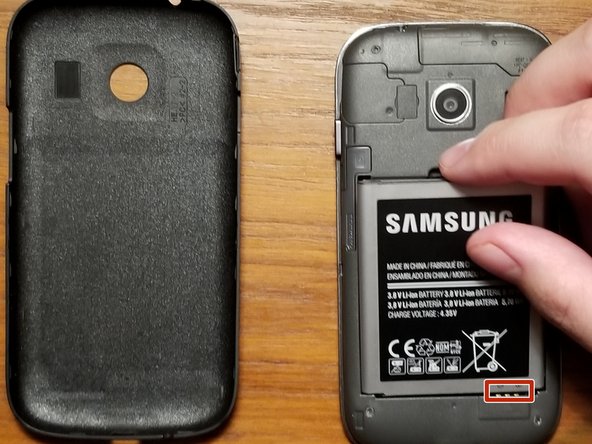
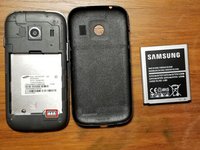
      • Place both the phone and the phone casing next to each other with the battery facing upwards.

      • Carefully lift the battery from the indent above the battery, then place the battery next to the phone.

      询问修复机器人

      添加评论

    4. Samsung Galaxy Stardust Battery Replacement: 步骤 4 中的图像 1,3 Samsung Galaxy Stardust Battery Replacement: 步骤 4 中的图像 2,3 Samsung Galaxy Stardust Battery Replacement: 步骤 4 中的图像 3,3
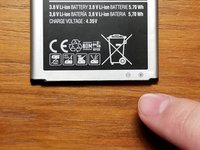
      • Take your new battery and look for the plus and minus signs on the bottom of the battery.

      • Line up the signs to the three strips on the bottom of the phone.

      • Carefully place the battery in until it is secure inside the phone.

      询问修复机器人

      添加评论

    5. Samsung Galaxy Stardust Battery Replacement: 步骤 5 中的图像 1,1
      • Take the back of the phone and line up the circular hole to the camera.

      • Apply force to the back of the phone with your hand, until the back case snaps onto the phone and is secure.

      询问修复机器人

      添加评论

终点

取消:我没有完成这个指南。

作者

与

Alan Kwong

于03/22/21注册

121 声望

撰写一个指南

团队

2指南评论

bom dia como concertar o samsung A32

camargowil - 回复 分享

bom dia podem me mandar ,para mim e outros armenque o esquema eletrico do samsung A32=SM-A32 5M/DS

como desmontar e se possivel o esquema eletrico.

camargowil - 回复 分享

添加评论

浏览统计数据:

过去 24 小时: 5

过去 7 天: 25

过去 30 天: 123

总计 4,883