此翻译由机器生成,尚未经过人工审核。 会说这种语言吗? 查看评论。

Samsung Galaxy J3 Emerge 屏幕更换

最后更新于 2026年8月9日
浏览量: 3829
浏览统计数据:
- 过去24小时
- 1
- 过去 7 天:
- 4
- 过去 30 天:
- 50
- 总计
- 3,829
评论: 2
2 guide comments.
Go to guide comments已完成: 7 8
7 人已将本指南标记为“已完成”。你会是下一个完成的人吗?
8 人已将本指南标记为“已完成”。包括你——干的漂亮!
收藏: 2 3
2 人已收藏(并订阅)本指南。你会是下一个吗?
3 人收藏(并订阅)了本指南——这其中包括你!
简介
转到步骤 1 ↓这是适用于 Samsung Galaxy J3 Emerge(型号 SM-J327P)的屏幕更换指南。请使用吹风机加热固定屏幕的显示屏粘合剂。如果屏幕无响应或设备无法开机,可能需要更换屏幕。如果原装屏幕发生屏幕破裂,也可以对其进行更换。
你所需要的
工具


 询问修复机器人


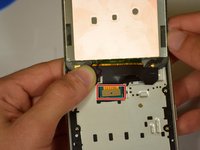
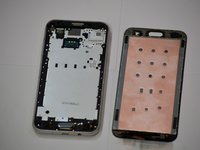
要重新组装设备,请按相反顺序执行这些说明。
7等其他人完成本指南。

团队

Cal Poly, Team S19-G2, White Winter 2019 Cal Poly, Team S19-G2, White Winter 2019 的会员
CPSU-WHITE-W19S19G2
4 名成员
创作了60篇指南
2指南评论
I was using my J3 Emerge last night and all of a sudden the screen just went blank. At first, I could press the power button and I would see the Samsung logo for a split second but now it doesn’t do that. You can tell it is trying to turn on because you can see it change from black to a blue like color. I thought it might be the battery so I took it to a store today to buy a new one but he said that wasn’t the problem. It is charging but I just can’t see anything. Do you think I need a new LCD screen or is it something else? Thank you!
