跳转到主内容
加入维修社区 - 创建账户

Realme 7i Screen Replacement

  1. Realme 7i Screen Replacement, Prepare the new screen, silicone glue, some precision driver set and a plastic card for prying: 步骤 1 中的图像 1,1
    • If needed, cover your phone screen with clear packaging tape to prevent glass shards from falling onto your workspace, as this guide involves a lot of wedging and work that could affect your broken screen.

  2. Realme 7i Screen Replacement, Pry the back plastic cover: 步骤 2 中的图像 1,3 Realme 7i Screen Replacement, Pry the back plastic cover: 步骤 2 中的图像 2,3 Realme 7i Screen Replacement, Pry the back plastic cover: 步骤 2 中的图像 3,3
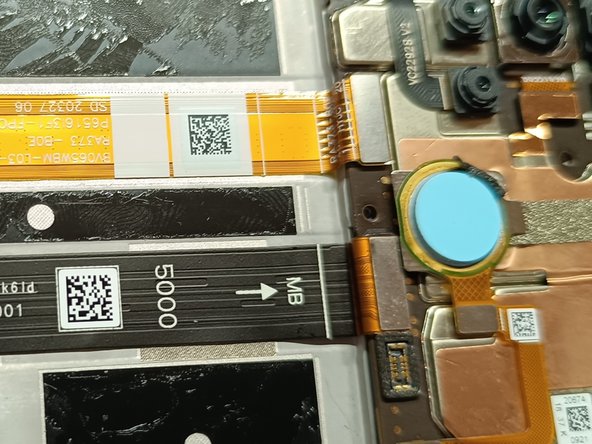
    • Use a card if you don't have a prying tool. Bear in mind that the fingerprint sensor also has glue on the perimeter.

  3. Realme 7i Screen Replacement, Remove the inner panel: 步骤 3 中的图像 1,3 Realme 7i Screen Replacement, Remove the inner panel: 步骤 3 中的图像 2,3 Realme 7i Screen Replacement, Remove the inner panel: 步骤 3 中的图像 3,3
    • Remove all the screws at the back. There should be 16 screws in total and they are all the same length.

  4. Realme 7i Screen Replacement, Remove the inner cover: 步骤 4 中的图像 1,3 Realme 7i Screen Replacement, Remove the inner cover: 步骤 4 中的图像 2,3 Realme 7i Screen Replacement, Remove the inner cover: 步骤 4 中的图像 3,3
    • Remove the sim card tray and pry the side of the frame,they are held on with tiny clips.

  5. Realme 7i Screen Replacement, Disconnect and remove the battery: 步骤 5 中的图像 1,3 Realme 7i Screen Replacement, Disconnect and remove the battery: 步骤 5 中的图像 2,3 Realme 7i Screen Replacement, Disconnect and remove the battery: 步骤 5 中的图像 3,3
    • Disconnect the battery from the motherboard and peel off the plastics on both sides of the battery. Pull on the green tab firmly and gently until the battery is free.

  6. Realme 7i Screen Replacement, Removing the screen: 步骤 6 中的图像 1,3 Realme 7i Screen Replacement, Removing the screen: 步骤 6 中的图像 2,3 Realme 7i Screen Replacement, Removing the screen: 步骤 6 中的图像 3,3
    • Remove the adhesive plastic and disconnect the screen from the motherboard. The screen can then be pried off from the front.

  7. Realme 7i Screen Replacement, Clean the frame: 步骤 7 中的图像 1,2 Realme 7i Screen Replacement, Clean the frame: 步骤 7 中的图像 2,2
    • Once the screen is off, use a small flathead to scrape the perimeter to clean the residue.

  8. Realme 7i Screen Replacement, Reapply the silicone glue: 步骤 8 中的图像 1,3 Realme 7i Screen Replacement, Reapply the silicone glue: 步骤 8 中的图像 2,3 Realme 7i Screen Replacement, Reapply the silicone glue: 步骤 8 中的图像 3,3
    • Prepare the new screen and apply glue to the perimeter of the frame

  9. Realme 7i Screen Replacement, Attach the new screen: 步骤 9 中的图像 1,2 Realme 7i Screen Replacement, Attach the new screen: 步骤 9 中的图像 2,2
    • Thread the ribbon cable through the cutout and press the new screen firmly. Reattach the cable to the motherboard at the back.

  10. Realme 7i Screen Replacement, Reinstall battery and test.: 步骤 10 中的图像 1,3 Realme 7i Screen Replacement, Reinstall battery and test.: 步骤 10 中的图像 2,3 Realme 7i Screen Replacement, Reinstall battery and test.: 步骤 10 中的图像 3,3
    • Apply the silicone glue to the dark areas so that the battery is secured. Ensure that the battery is connected to the motherboard. Install the plastic frame and test the phone before screwing it down.

结论

To reassemble your device, follow these instructions in reverse order.

5等其他人完成本指南。

clem

于05/08/19注册

505 声望

创作了2篇指南

0指南评论

添加评论

浏览统计数据:

过去 24 小时: 2

过去 7 天: 12

过去 30 天: 60

总计 717