跳转到主内容
加入维修社区 - 创建账户

Palm Treo 700P Keypad Replacement

你所需要的

  1. Palm Treo 700P Keypad Replacement, Battery: 步骤 1 中的图像 1,3 Palm Treo 700P Keypad Replacement, Battery: 步骤 1 中的图像 2,3 Palm Treo 700P Keypad Replacement, Battery: 步骤 1 中的图像 3,3
    • Press the button located just above the Sprint™ logo and then slide the cover down.

    询问修复机器人
    添加评论

  2. Palm Treo 700P Keypad Replacement: 步骤 2 中的图像 1,2 Palm Treo 700P Keypad Replacement: 步骤 2 中的图像 2,2
    • Use the small notch on the left hand side of the phone to remove the battery.

    询问修复机器人
    添加评论

  3. Palm Treo 700P Keypad Replacement, Back Case: 步骤 3 中的图像 1,1
    • Remove the stylus from the phone.

    询问修复机器人
    添加评论

  4. Palm Treo 700P Keypad Replacement: 步骤 4 中的图像 1,1
    • After removing the battery and stylus, unscrew the 5 Torx screws (using a T-5 Torx screw driver)

    询问修复机器人

    添加评论

  5. Palm Treo 700P Keypad Replacement: 步骤 5 中的图像 1,1
    • Using the spudger, remove the small rubberized patch under the antenna.

    询问修复机器人

    添加评论

  6. Palm Treo 700P Keypad Replacement: 步骤 6 中的图像 1,1
    • Unscrew the last two screws using the previous screw driver.

    询问修复机器人

    添加评论

  7. Palm Treo 700P Keypad Replacement: 步骤 7 中的图像 1,2 Palm Treo 700P Keypad Replacement: 步骤 7 中的图像 2,2
    • Using the plastic opening tool, gently separate the back case from the phone body.

    询问修复机器人

    添加评论

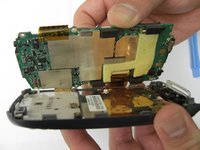
  8. Palm Treo 700P Keypad Replacement, Motherboard: 步骤 8 中的图像 1,3 Palm Treo 700P Keypad Replacement, Motherboard: 步骤 8 中的图像 2,3 Palm Treo 700P Keypad Replacement, Motherboard: 步骤 8 中的图像 3,3
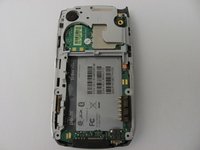
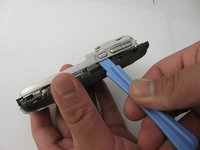
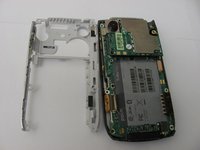
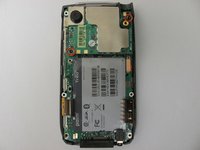
    • Using a plastic opening tool, gently edge your way between the back and border case (Picture 2) until they are completely separated (Picture 3).

    询问修复机器人

    添加评论

  9. Palm Treo 700P Keypad Replacement: 步骤 9 中的图像 1,3 Palm Treo 700P Keypad Replacement: 步骤 9 中的图像 2,3 Palm Treo 700P Keypad Replacement: 步骤 9 中的图像 3,3
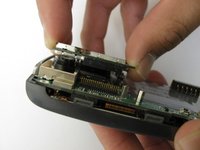
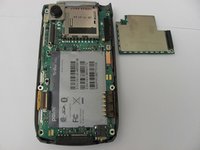
    • Remove the antenna chip by unscrewing the two screws with Torx T-5 screwdriver (Picture 1).

    • Once unscrewed, gently detach the antenna chip with your hands (Picture 2).

    询问修复机器人

    添加评论

  10. Palm Treo 700P Keypad Replacement: 步骤 10 中的图像 1,2 Palm Treo 700P Keypad Replacement: 步骤 10 中的图像 2,2
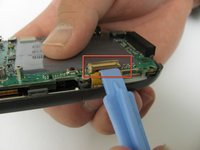
    • Use the plastic opening tool to unlock the tab holding the keyboard connection (Picture 1).

    • Once the keyboard connection is detached, use your hands to gently separate the motherboard from the back panel (Picture 2).

    询问修复机器人

    添加评论

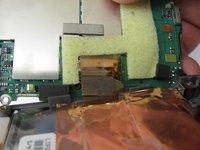
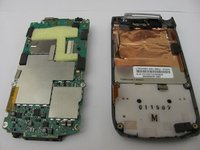
  11. Palm Treo 700P Keypad Replacement: 步骤 11 中的图像 1,3 Palm Treo 700P Keypad Replacement: 步骤 11 中的图像 2,3 Palm Treo 700P Keypad Replacement: 步骤 11 中的图像 3,3
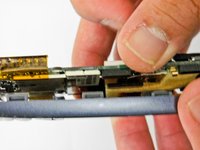
    • To completely detach the motherboard from the back panel, use the plastic opening tool to unlock the LCD connection from the motherboard (Picture 2).

    • Once the LCD connection is unlocked, the motherboard should now be completely detached from the back panel, keyboard, and LCD (Picture 3).

    询问修复机器人

    添加评论

  12. Palm Treo 700P Keypad Replacement, LCD: 步骤 12 中的图像 1,1
    • Once the motherboard is removed, the LCD should be resting on the front case of the phone.

    询问修复机器人

    添加评论

  13. Palm Treo 700P Keypad Replacement, Keypad: 步骤 13 中的图像 1,1
    • Peel the keypad from the front panel of the case

    询问修复机器人

    添加评论

  14. Palm Treo 700P Keypad Replacement: 步骤 14 中的图像 1,1
    • Using a spudger, remove the gel keyboard from the front case.

    询问修复机器人

    添加评论

结论

To reassemble your device, follow these instructions in reverse order.

取消:我没有完成这个指南。

James Smith

于04/27/12注册

10 声望

创作了3篇指南

团队

Cal Poly, Team 12-37, Regan Spring 2012 Cal Poly, Team 12-37, Regan Spring 2012 的会员

CPSU-REGAN-S12S12G37

4 名成员

创作了14篇指南

0指南评论

添加评论

浏览统计数据:

过去 24 小时: 1

过去 7 天: 8

过去 30 天: 40

总计 988