跳转到主内容

PSP E1000 Battery Replacement

你所需要的

  1. PSP E1000 Battery Replacement, Battery: 步骤 1 中的图像 1,2 PSP E1000 Battery Replacement, Battery: 步骤 1 中的图像 2,2
    • To start the replacement flip the device over

  2. PSP E1000 Battery Replacement: 步骤 2 中的图像 1,2 PSP E1000 Battery Replacement: 步骤 2 中的图像 2,2
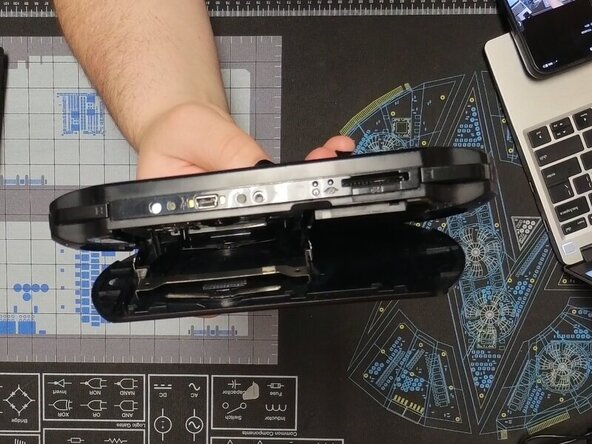
    • We are going to start by removing the back panel.

    • To do this open the panel and gently squeeze in the UMD tray until it pops up.

    • It should lay flat against the back panel while open if done correctly

  3. PSP E1000 Battery Replacement: 步骤 3 中的图像 1,2 PSP E1000 Battery Replacement: 步骤 3 中的图像 2,2
    • Gently bend the back panel to free the hinge on the left.

    • Once it is popped out it should look like the second photo

    • The back panel can then be slid off

  4. PSP E1000 Battery Replacement: 步骤 5 中的图像 1,3 PSP E1000 Battery Replacement: 步骤 5 中的图像 2,3 PSP E1000 Battery Replacement: 步骤 5 中的图像 3,3
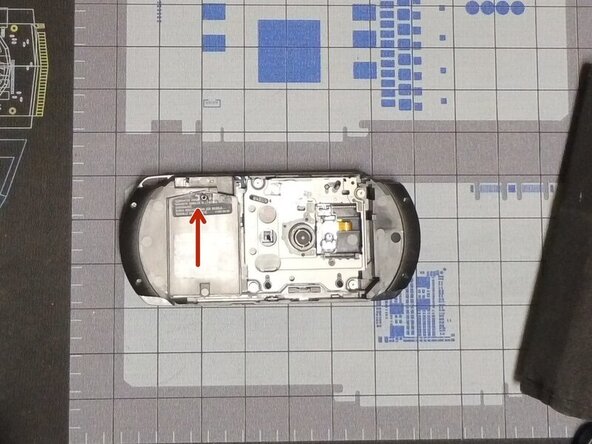
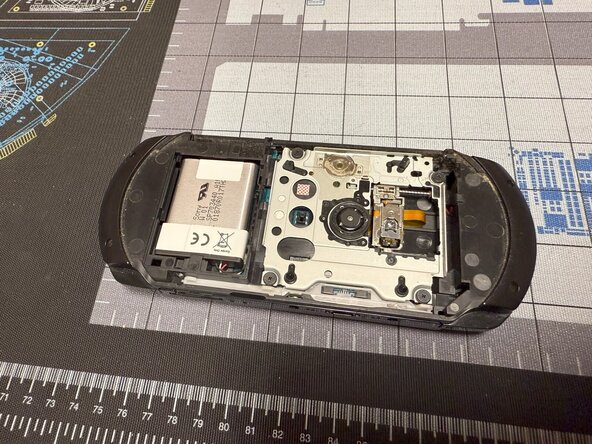
    • Remove the screw with a #00 Philips and slide up the battery cover.

    • The battery can now be removed by pulling it out.

    • When reinstalling, it is useful to use a spudger to push the cable back in.

    • Congratulations you have replaced your PSP E1000's battery

结论

To reassemble your device, follow these instructions in reverse order.

2等其他人完成本指南。

Caleb Pierce

于04/19/22注册

1,121 声望

创作了8篇指南

1指南评论

添加评论

浏览统计数据:

过去 24 小时: 4

过去 7 天: 72

过去 30 天: 262

总计 2,329
