跳转到主内容
加入维修社区 - 创建账户

OnePlus 8 Pro Battery Replacement

你所需要的

  1. OnePlus 8 Pro Battery Replacement, Battery: 步骤 1 中的图像 1,1
    • Heat up the back edge of the phone with the iOpener / any HotPack.

    • Start with a long edge as it is easier to open the back cover in the next step.

    • You may also use a hair dryer or heat gun to heat the adhesive.

    • Be careful not to overheat the phone - the screen and internal battery are susceptible to heat damage.

  2. OnePlus 8 Pro Battery Replacement: 步骤 2 中的图像 1,1
    • Insert the opening pick in the middle of the phone where you heated it. Slide it along the edge to cut through the adhesive.

    • This can be a bit tricky, don't use any sharp objects as you can damage the case. It's reccomended that you use a plastic wedge tool such as the one by iFixit, as it has a thicker ledge to prevent you from slicing too far in.

    • If it does not work, try heating the edge again.

    • Don't insert the opening pick too far. There are no flex cables in the way, but the wireless charging coil could be damaged.

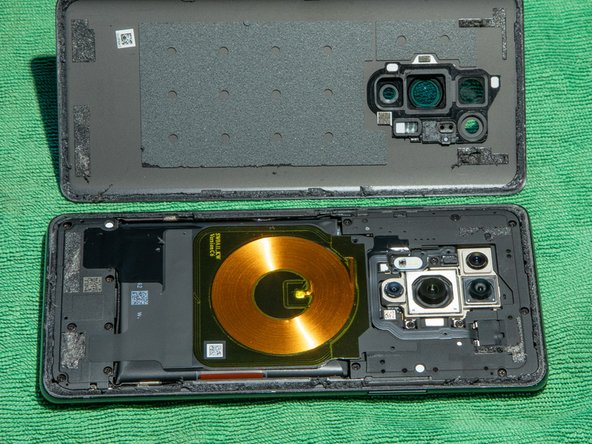
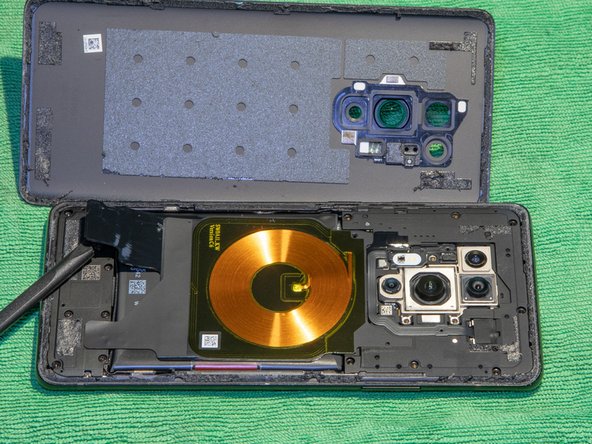
  3. OnePlus 8 Pro Battery Replacement: 步骤 3 中的图像 1,2 OnePlus 8 Pro Battery Replacement: 步骤 3 中的图像 2,2
    • Leave the opening picks once you managed to open one side.

    • Use heat on the next edge to open it.

    • Repeat steps 2 and 3 for all four edges.

  4. OnePlus 8 Pro Battery Replacement: 步骤 4 中的图像 1,1
    • Remove these screws (Phillips 00).

    • Remove this Phillips 00 screw. You can remove the white paper with tweezers or just push the screwdriver through the paper.

  5. OnePlus 8 Pro Battery Replacement: 步骤 5 中的图像 1,2 OnePlus 8 Pro Battery Replacement: 步骤 5 中的图像 2,2
    • Carefully lift the two stickers which hold the wireless charging coil down.

  6. OnePlus 8 Pro Battery Replacement: 步骤 6 中的图像 1,1
    • Lift the charging coil.

    • Remove the two Phillips 00 screws below the coil.

  7. OnePlus 8 Pro Battery Replacement: 步骤 7 中的图像 1,1
    • Remove the top cover / coil assembly.

  8. OnePlus 8 Pro Battery Replacement: 步骤 8 中的图像 1,1
    • Disconnect the battery.

  9. OnePlus 8 Pro Battery Replacement: 步骤 9 中的图像 1,1
    • Pull the red pulling tab away from the battery.

    • Separate the red pulling tab from the black adhesive.

    • After separating, hold the black adhesive down and pull the red tab up vertically to remove the battery.

    • Make sure not to bend the battery too heavily.

  10. OnePlus 8 Pro Battery Replacement: 步骤 10 中的图像 1,2 OnePlus 8 Pro Battery Replacement: 步骤 10 中的图像 2,2
    • Remove the red pulling tab from the old battery and stick it on the under side of the new battery.

    • This makes it easier to replace the battery again.

    • Insert the new battery.

    • Wrap the black adhesive strips on both sides around the battery to secure it.

  11. OnePlus 8 Pro Battery Replacement: 步骤 11 中的图像 1,1
    • Remove the old adhesive and replace it with new adhesive strips.

    • Reverse from step 8 to assemble the phone.

结论

To reassemble your device, follow these instructions in reverse order.

Manuel Graf

于01/21/20注册

193 声望

撰写一个指南

1指南评论

be carefull: the adhesives of the back cover are not only on the edge, but also on the 4 corners (see the back cover on photo of step 4). You should carefully cut these off from the short edges, BEFORE trying to lift the cover.

LeFils - 回复

添加评论

浏览统计数据:

过去 24 小时: 3

过去 7 天: 45

过去 30 天: 209

总计 1,689