跳转到主内容
加入维修社区 - 创建账户

Nook Tablet Speaker Assembly Replacement

你所需要的

    1. Nook Tablet Speaker Assembly Replacement, Back Cover: 步骤 1 中的图像 1,1
      • Flip the Nook over.

      询问修复机器人

      添加评论

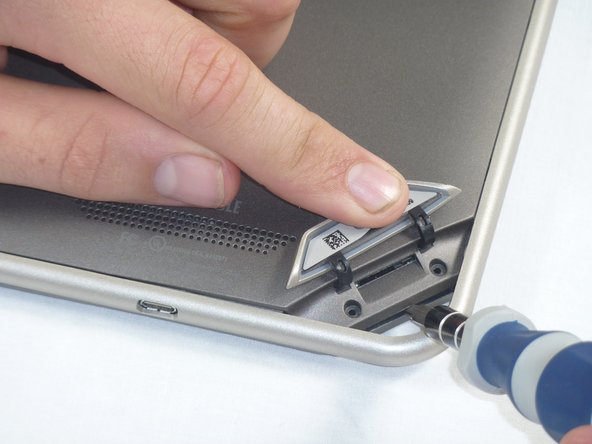
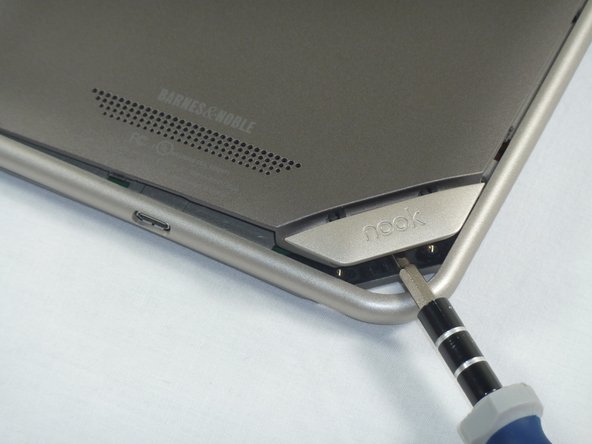
    2. Nook Tablet Speaker Assembly Replacement: 步骤 2 中的图像 1,2 Nook Tablet Speaker Assembly Replacement: 步骤 2 中的图像 2,2
      • Lift the flap that reads "Nook" to reveal the tape that is underneath. Remove the memory card if one is present.

      • Remove the tape covering the round holes to reveal two T5 Torx screws.

      • Remove the two T5 Torx screws securing the back cover.

      添加评论

    3. Nook Tablet Speaker Assembly Replacement: 步骤 3 中的图像 1,2 Nook Tablet Speaker Assembly Replacement: 步骤 3 中的图像 2,2
      • Insert the flat end of a spudger between the front panel and the rear assembly.

      • Though these photos show a screwdriver, use a spudger or plastic opening tool in order to prevent damage to the device.

      • Use a spudger to lift the the back panel from the rest of the Nook.

      询问修复机器人

      添加评论

    4. Nook Tablet Speaker Assembly Replacement: 步骤 4 中的图像 1,2 Nook Tablet Speaker Assembly Replacement: 步骤 4 中的图像 2,2
      • Slide the spudger around the edges of the Nook to loosen the back panel.

      询问修复机器人

      添加评论

    5. Nook Tablet Speaker Assembly Replacement: 步骤 5 中的图像 1,1
      • Pull the back panel off the Nook.

      询问修复机器人

      添加评论

    1. Nook Tablet Speaker Assembly Replacement, Screen Bezel: 步骤 6 中的图像 1,2 Nook Tablet Speaker Assembly Replacement, Screen Bezel: 步骤 6 中的图像 2,2
      • Using the T5 Torx screwdriver, remove the ten T5 screws from around the edges of the silver midframe.

      询问修复机器人

      添加评论

    2. Nook Tablet Speaker Assembly Replacement: 步骤 7 中的图像 1,2 Nook Tablet Speaker Assembly Replacement: 步骤 7 中的图像 2,2
      • Using a spudger or plastic opening tool, carefully pry the screen bezel away from the silver midframe.

      询问修复机器人

      添加评论

    1. Nook Tablet Speaker Assembly Replacement, Disconnect the Battery: 步骤 8 中的图像 1,2 Nook Tablet Speaker Assembly Replacement, Disconnect the Battery: 步骤 8 中的图像 2,2
      • Lift up the foam pad at the corner of the battery to reveal the battery connector.

      • Use a spudger or plastic opening tool to disconnect the battery cable from the motherboard.

      • These photos show a screwdriver, but we recommend using a nonconductive tool like a spudger to prevent a potential short.

      询问修复机器人

      添加评论

    1. Nook Tablet Speaker Assembly Replacement, Midframe: 步骤 9 中的图像 1,1
      • Lift up the foam that covers the power connector and volume connector.

      • Disconnect the power and volume cables from their sockets on the motherboard.

      询问修复机器人

      添加评论

    2. Nook Tablet Speaker Assembly Replacement: 步骤 10 中的图像 1,2 Nook Tablet Speaker Assembly Replacement: 步骤 10 中的图像 2,2
      • Carefully lift the silver midframe away from the motherboard and display assembly.

      • Be careful when handling the motherboard, making sure to not dislodge/shift any of its major components.

      询问修复机器人

      添加评论

    1. Nook Tablet Speaker Assembly Replacement, Removing Speaker Assembly: 步骤 11 中的图像 1,1
      • Using your hands pull the square speaker assembly component off the motherboard.

      询问修复机器人

      添加评论

    2. Nook Tablet Speaker Assembly Replacement, Replacing Speaker Assembly: 步骤 12 中的图像 1,1
      • Now place the new speaker assembly component back in the same square location.

      • As Step 12 mentions, make sure to realign the speaker assembly correctly in the square.

      询问修复机器人

      添加评论

结论

To reassemble your device, follow these instructions in reverse order.

取消:我没有完成这个指南。

另外一个人完成了本指南。

Josh Fisher

于09/26/12注册

9 声望

撰写一个指南

团队

Cal Poly, Team 1-4, Propen Fall 2012 Cal Poly, Team 1-4, Propen Fall 2012 的会员

CPSU-PROPEN-F12S1G4

4 名成员

创作了15篇指南

0指南评论

添加评论

浏览统计数据:

过去 24 小时: 1

过去 7 天: 16

过去 30 天: 45

总计 2,540