跳转到主内容
加入维修社区 - 创建账户
Nokia 2128i Charging Port Replacement

你所需要的

  1. Nokia 2128i Charging Port Replacement, Battery: 步骤 1 中的图像 1,3 Nokia 2128i Charging Port Replacement, Battery: 步骤 1 中的图像 2,3 Nokia 2128i Charging Port Replacement, Battery: 步骤 1 中的图像 3,3
    • Be sure cell phone is off before you begin to disassemble the phone.

    • Press the button on the bottom of the back of the cell phone.

    • Slide rear panel down and remove it.

    询问修复机器人
  2. Nokia 2128i Charging Port Replacement: 步骤 2 中的图像 1,3 Nokia 2128i Charging Port Replacement: 步骤 2 中的图像 2,3 Nokia 2128i Charging Port Replacement: 步骤 2 中的图像 3,3
    • Using your fingernail, pry the back of the battery upwards and pull out.

    询问修复机器人
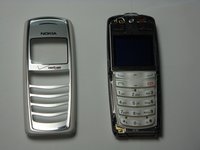
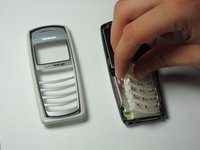
  3. Nokia 2128i Charging Port Replacement, Faceplate: 步骤 3 中的图像 1,3 Nokia 2128i Charging Port Replacement, Faceplate: 步骤 3 中的图像 2,3 Nokia 2128i Charging Port Replacement, Faceplate: 步骤 3 中的图像 3,3
    • Insert the plastic opening tool under the faceplate.

    • Separate the faceplate from main body by twisting the prying tool with some force.

    • The faceplate is held by three plastic fasteners, so pry evenly on both sides of phone.

    询问修复机器人
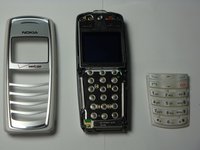
  4. Nokia 2128i Charging Port Replacement, Keypad: 步骤 4 中的图像 1,3 Nokia 2128i Charging Port Replacement, Keypad: 步骤 4 中的图像 2,3 Nokia 2128i Charging Port Replacement, Keypad: 步骤 4 中的图像 3,3
    • With the faceplate removed, simply peel off rubber key pad and remove.

    询问修复机器人
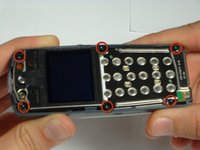
  5. Nokia 2128i Charging Port Replacement, Motherboard Assembly: 步骤 5 中的图像 1,3 Nokia 2128i Charging Port Replacement, Motherboard Assembly: 步骤 5 中的图像 2,3 Nokia 2128i Charging Port Replacement, Motherboard Assembly: 步骤 5 中的图像 3,3
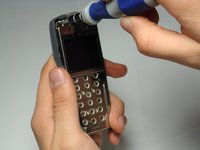
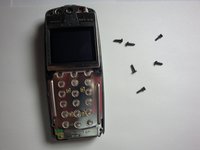
    • Locate and remove the six screws on the front of the phone using a T6 Torx.

    • All 6 screws are 6.9mm long.

    询问修复机器人
  6. Nokia 2128i Charging Port Replacement: 步骤 6 中的图像 1,3 Nokia 2128i Charging Port Replacement: 步骤 6 中的图像 2,3 Nokia 2128i Charging Port Replacement: 步骤 6 中的图像 3,3
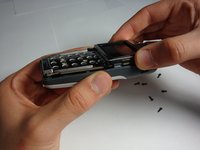
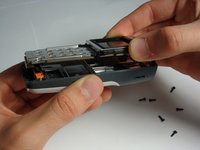
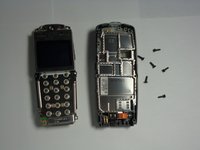
    • After removing screws, lift the motherboard assembly straight off the cell phone body.

    询问修复机器人
  7. Nokia 2128i Charging Port Replacement, Charging Port: 步骤 7 中的图像 1,2 Nokia 2128i Charging Port Replacement, Charging Port: 步骤 7 中的图像 2,2
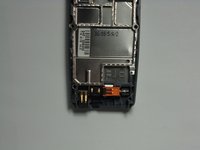
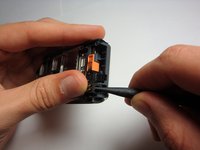
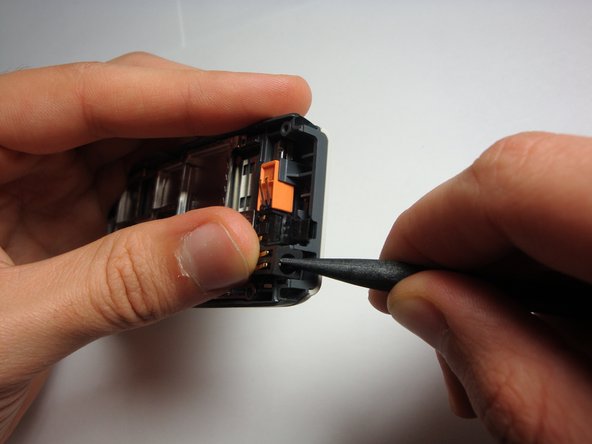
    • With the logic board and LCD unit removed, gently pry out the charging port.

    询问修复机器人
结论

To reassemble your device, follow these instructions in reverse order.

团队

Cal Poly, Team 20-8, Maness Fall 2010 Cal Poly, Team 20-8, Maness Fall 2010 的会员

CPSU-MANESS-F10S20G8

4 名成员

创作了24篇指南

0指南评论

添加评论

浏览统计数据:

过去 24 小时: 4

过去 7 天: 15

过去 30 天: 59

总计 3,259