跳转到主内容
加入维修社区 - 创建账户

Nikon D70 Memory Compression Board Replacement

你所需要的

    1. Nikon D70 Memory Compression Board Replacement, Battery: 步骤 1 中的图像 1,1
      • Use your finger tip to pull the battery release tab toward the center of the D70.

      • Open the battery door and rotate it away from the bottom cover.

      询问修复机器人

      添加评论

    2. Nikon D70 Memory Compression Board Replacement: 步骤 2 中的图像 1,1
      • Pull the battery out of the D70.

      • It may be necessary to wiggle the battery while pulling to free it from its pocket in the case.

      询问修复机器人

      添加评论

    1. Nikon D70 Memory Compression Board Replacement, Bottom Cover: 步骤 3 中的图像 1,1
      • Remove the following eight screws securing the bottom cover to the D70:

      • Six 5.8 mm Phillips screws

      • One 10.7 mm Phillips screws

      • One 8.2 mm Phillips screws

      询问修复机器人

      添加评论

    2. Nikon D70 Memory Compression Board Replacement: 步骤 4 中的图像 1,2 Nikon D70 Memory Compression Board Replacement: 步骤 4 中的图像 2,2
      • Carefully pull the bottom cover to separate it from the body of the D70.

      • Remove the bottom cover from the D70.

      询问修复机器人

      添加评论

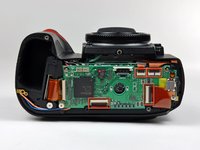
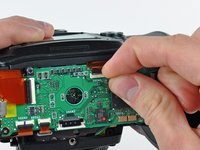
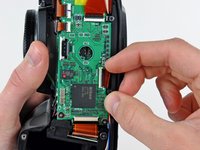
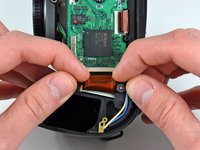
    1. Nikon D70 Memory Compression Board Replacement, Memory Compression Board: 步骤 5 中的图像 1,3 Nikon D70 Memory Compression Board Replacement, Memory Compression Board: 步骤 5 中的图像 2,3 Nikon D70 Memory Compression Board Replacement, Memory Compression Board: 步骤 5 中的图像 3,3
      • Remove the four ZIF ribbon cables highlighted in red by using the following procedure:

      • Use your fingernail to flip up the ZIF cable retaining flap on each socket.

      • Be sure you are prying up the retaining flap, not the socket.

      • Pull the ribbon cable straight out of its socket.

      询问修复机器人

      添加评论

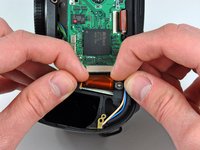
    2. Nikon D70 Memory Compression Board Replacement: 步骤 6 中的图像 1,1
      • Carefully peel back the piece of tape covering the Compact Flash ribbon cable socket.

      • It is not necessary to completely remove this piece of tape.

      询问修复机器人

      添加评论

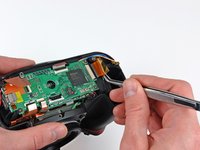
    3. Nikon D70 Memory Compression Board Replacement: 步骤 7 中的图像 1,3 Nikon D70 Memory Compression Board Replacement: 步骤 7 中的图像 2,3 Nikon D70 Memory Compression Board Replacement: 步骤 7 中的图像 3,3
      在这个步骤中使用的工具:
      Tweezers
      $4.99
      • Use your fingernails to carefully pull the ZIF cable lock away from its socket.

      • Do not try to completely remove the ZIF cable lock. It will move about 1 mm and stop.

      • Use a pair of tweezers to pull the Compact Flash ribbon cable out of its socket.

      询问修复机器人

      添加评论

    4. Nikon D70 Memory Compression Board Replacement: 步骤 8 中的图像 1,1
      • Be sure not to lose the small iron core around the DC-In ribbon cable.

      询问修复机器人

      添加评论

    5. Nikon D70 Memory Compression Board Replacement: 步骤 9 中的图像 1,1
      • Remove the four 4.3 mm Phillips screws securing the memory compression board to the D70.

      询问修复机器人

      添加评论

    6. Nikon D70 Memory Compression Board Replacement: 步骤 10 中的图像 1,1
      • Use a pair of tweezers to pull the USB connector bracket away from the edge of the memory compression board.

      询问修复机器人

      添加评论

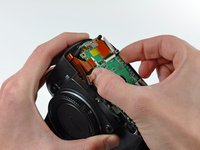
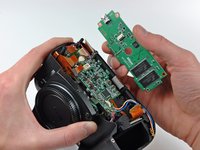
    7. Nikon D70 Memory Compression Board Replacement: 步骤 11 中的图像 1,2 Nikon D70 Memory Compression Board Replacement: 步骤 11 中的图像 2,2
      • Grab the memory compression board by its edges at the position shown in the first picture.

      • Pull the memory compression board straight up off the DC/DC board to avoid damaging the connector on the underside of the memory compression board.

      询问修复机器人

      添加评论

结论

To reassemble your device, follow these instructions in reverse order.

取消:我没有完成这个指南。

4等其他人完成本指南。

0指南评论

添加评论

浏览统计数据:

过去 24 小时: 7

过去 7 天: 32

过去 30 天: 53

总计 24,425