跳转到主内容
加入维修社区 - 创建账户

Nikon D70 LCD Board Replacement

你所需要的

  1. Nikon D70 LCD Board Replacement, Battery: 步骤 1 中的图像 1,1
    • Use your finger tip to pull the battery release tab toward the center of the D70.

    • Open the battery door and rotate it away from the bottom cover.

    询问修复机器人

    添加评论

  2. Nikon D70 LCD Board Replacement: 步骤 2 中的图像 1,1
    • Pull the battery out of the D70.

    • It may be necessary to wiggle the battery while pulling to free it from its pocket in the case.

    询问修复机器人

    添加评论

  3. Nikon D70 LCD Board Replacement, Rear Cover Assembly: 步骤 3 中的图像 1,1
    • Remove the two 4.8 mm Phillips screws securing the battery side of the rear cover to the D70.

    询问修复机器人

    添加评论

  4. Nikon D70 LCD Board Replacement: 步骤 4 中的图像 1,1
    • Remove the two 4.8 mm Phillips screws securing the port side of the rear cover to the D70.

    询问修复机器人

    添加评论

  5. Nikon D70 LCD Board Replacement: 步骤 5 中的图像 1,2 Nikon D70 LCD Board Replacement: 步骤 5 中的图像 2,2
    • Use your fingernail to flip up the ZIF locking flap on the LCD ribbon cable socket.

    • Be sure you are opening the locking tab, not pulling against the socket mounted to the board.

    • Pull the LCD board ribbon cable out of its socket.

    询问修复机器人

    添加评论

  6. Nikon D70 LCD Board Replacement: 步骤 6 中的图像 1,2 Nikon D70 LCD Board Replacement: 步骤 6 中的图像 2,2
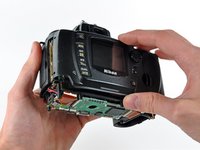
    • Carefully pull the sides of the rear cover away from the body of the D70.

    询问修复机器人

    添加评论

  7. Nikon D70 LCD Board Replacement: 步骤 7 中的图像 1,2 Nikon D70 LCD Board Replacement: 步骤 7 中的图像 2,2
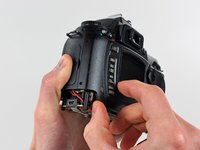
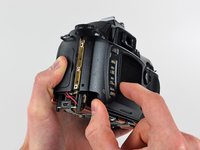
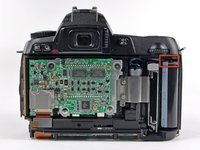
    • Pull the rear cover off the body of the D70, minding the LCD board ribbon cable that may get caught.

    • At this point, the capacitor is visible and its exposed contacts are boxed in red in the second picture. Even though they are recessed, be careful not to touch the contacts to avoid shocking yourself.

    询问修复机器人

    添加评论

  8. Nikon D70 LCD Board Replacement, LCD Assembly: 步骤 8 中的图像 1,2 Nikon D70 LCD Board Replacement, LCD Assembly: 步骤 8 中的图像 2,2
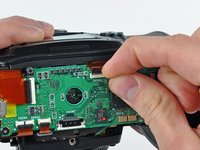
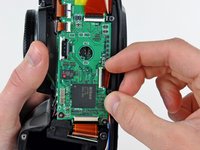
    • Use your thumbnails to push the ZIF cable lock toward the LCD.

    • Do not completely remove the ZIF cable lock. It should move about 1 mm and stop. Be sure you are pushing against the lock, not the socket.

    • Pull the LCD ribbon cable out of its socket.

    询问修复机器人

    添加评论

  9. Nikon D70 LCD Board Replacement: 步骤 9 中的图像 1,1
    在这个步骤中使用的工具:
    Tweezers
    $4.99
    • Use a pair of tweezers to pull the LCD backlight connector away from its socket.

    • It may help to wiggle the connector as you pull it out of its socket.

    询问修复机器人

    添加评论

  10. Nikon D70 LCD Board Replacement: 步骤 10 中的图像 1,2 Nikon D70 LCD Board Replacement: 步骤 10 中的图像 2,2
    • Remove the two 4.8 mm Phillips screws securing the LCD bracket to the rear cover.

    • Lift the LCD bracket out of the rear cover.

    询问修复机器人

    添加评论

  11. Nikon D70 LCD Board Replacement: 步骤 11 中的图像 1,1
    • Remove the LCD assembly from the rear cover.

    • Be sure both the face of the LCD and the inner face of the clear LCD cover are perfectly clean before reassembly, as any dust or fingerprints trapped inside will be annoyingly visible when the device is turned on.

    询问修复机器人

    添加评论

  12. Nikon D70 LCD Board Replacement, LCD Board: 步骤 12 中的图像 1,1
    • Remove the three 3.1 mm Phillips screws securing the LCD board to the rear cover.

    询问修复机器人

    添加评论

  13. Nikon D70 LCD Board Replacement: 步骤 13 中的图像 1,1
    • Remove the LCD board from the rear cover.

    询问修复机器人

    添加评论

结论

To reassemble your device, follow these instructions in reverse order.

取消:我没有完成这个指南。

4等其他人完成本指南。

0指南评论

添加评论

浏览统计数据:

过去 24 小时: 2

过去 7 天: 8

过去 30 天: 35

总计 10,020